 Blog
Blog Podcast
 Soutien
 Connexion client

Comment Elena Mutonono a conçu une expérience d'adhésion élégante que ses utilisateurs adorent
En début d'année, nous avons invité une entrepreneuse du nom d'Elena Mutonono à participer à notre podcast et à nous raconter comment elle a créé un site d'adhésion à succès pour les professeurs de langues. Après avoir enregistré son épisode (que vous pouvez à vérifier ici), Elena was kind enough to give us a quick tour of her member’s area.
Nous avons été très impressionnés par le site qu'elle a créé. Nous avons alors entamé une longue conversation sur la conception de l'apprentissage, la gestion du contenu et l'expérience des membres. Plus Elena en parlait, plus nous réalisions que nous devions trouver un moyen de vous présenter son site.
This is why we’re so excited to share this video training with you today.
In it, you’ll get to see a full tour of the elegant membership site that Elena — and her incredible web designer Jessica — have created. We start at the very beginning and look at the public facing side of Elena’s website: from her home page, lead magnets, and membership sales page. Then, we walk through the exact process her members go through to to enroll in her membership: from the checkout process to the member dashboard and protected content pages.
Elena and Jessica then give you an in-depth tour of their private member’s area, showing you how they structure their content and design their private pages. It is so fascinating to get a true behind-the-scenes look of a successful membership site. Plus, Elena generously reveals all the different tools and plugins she uses to power her site.
The process of building a membership site can often feel overwhelming. There are so many choices to make, pages to design, tools to integrate. And even though Elena’s site uses a lot of different tools, she’s found a way to keep things simple for both her team and her members. If you’ve ever felt overwhelmed by the process of designing your own membership site, we have a feeling you’ll love this video. What Elena has created is both powerful and simple. And it’s a great example of what’s possible when you’re intentional about the experience you want to create for your members.
Prêt à plonger ? Cliquez sur la vidéo ci-dessous.

“The thing about our membership area is that it’s a library — not an online course. You’re not required to go from A to Z. You don’t go to the library to read all the books. But it’s there when you need something. And that’s the whole point of our community.”
What You’ll Discover In This Video
| 0:00 | Introduction to the Smart Teacher’s Library |
|---|---|
| 3:21 | The exact tech stack that powers Elena’s site |
| 7:29 | A tour of the Smart Teacher’s Library “front end” user experience |
| 10:12 | A quick look at Elena’s membership sales page |
| 12:33 | Fonctionnement de l'expérience de paiement des membres |
| 13:49 | A behind the scenes look at the Smart Teacher’s Library member experience |
| 24:42 | La page Mon compte |
| 26:34 | Elena & Jessica’s membership UX and content design philosophy |
| 32:53 | Conclusion |
Les pages clés de l'expérience d'adhésion
In this behind the scenes video, you’ll see how Elena and her designer Jessica designed the Smart Teacher’s Library. Plus, they share their excellent ideas about learning design, user experience, and membership content management.
Here’s a sneak peek at some of the pages we cover in the video:
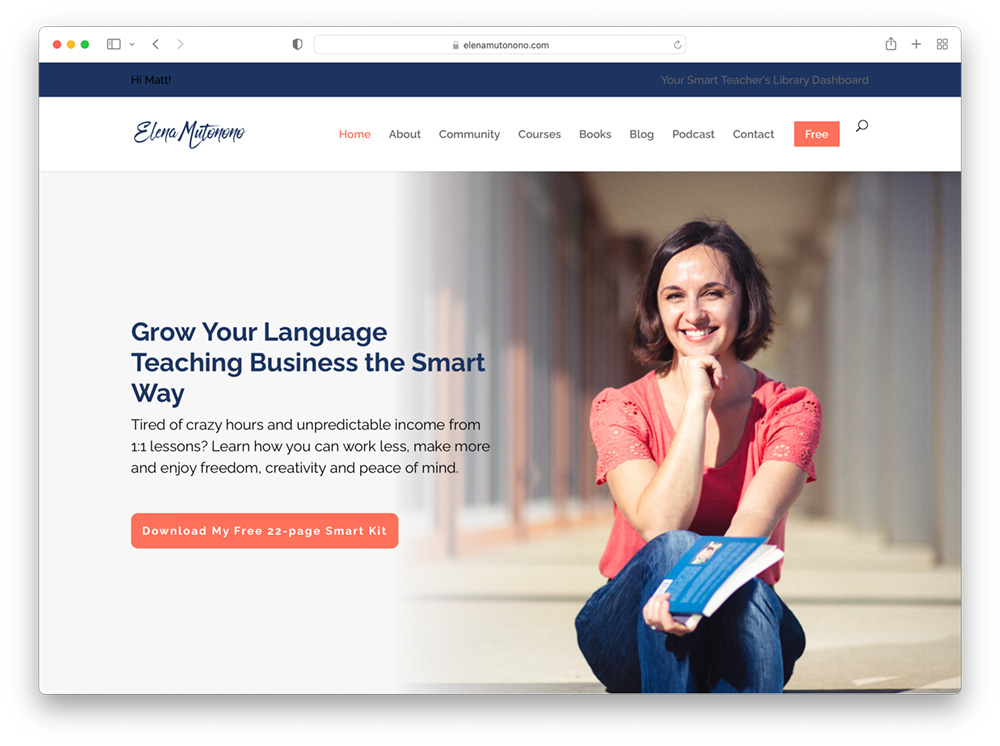
The Smart Teacher’s Library Home Page
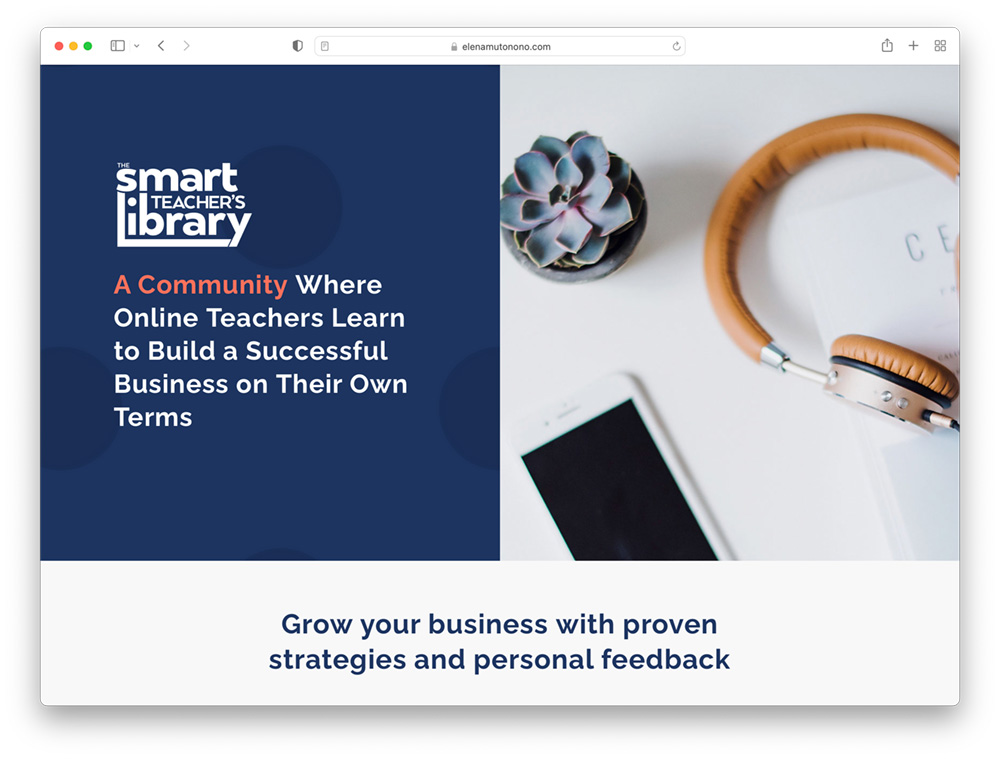
The Smart Teacher’s Library Sales Page
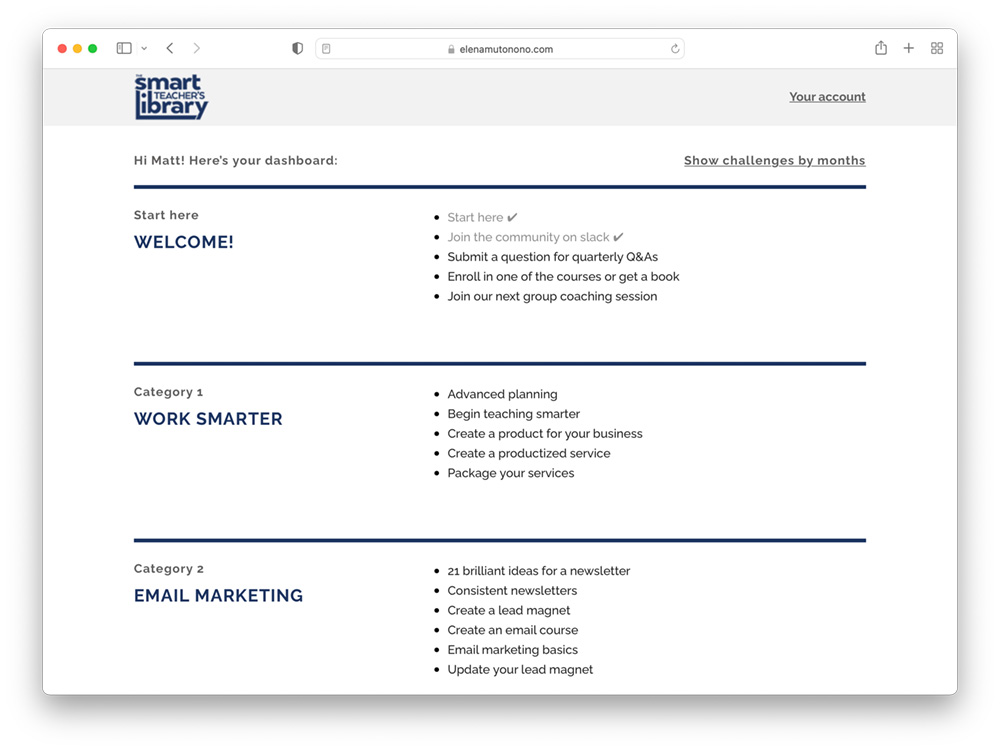
Le tableau de bord des membres
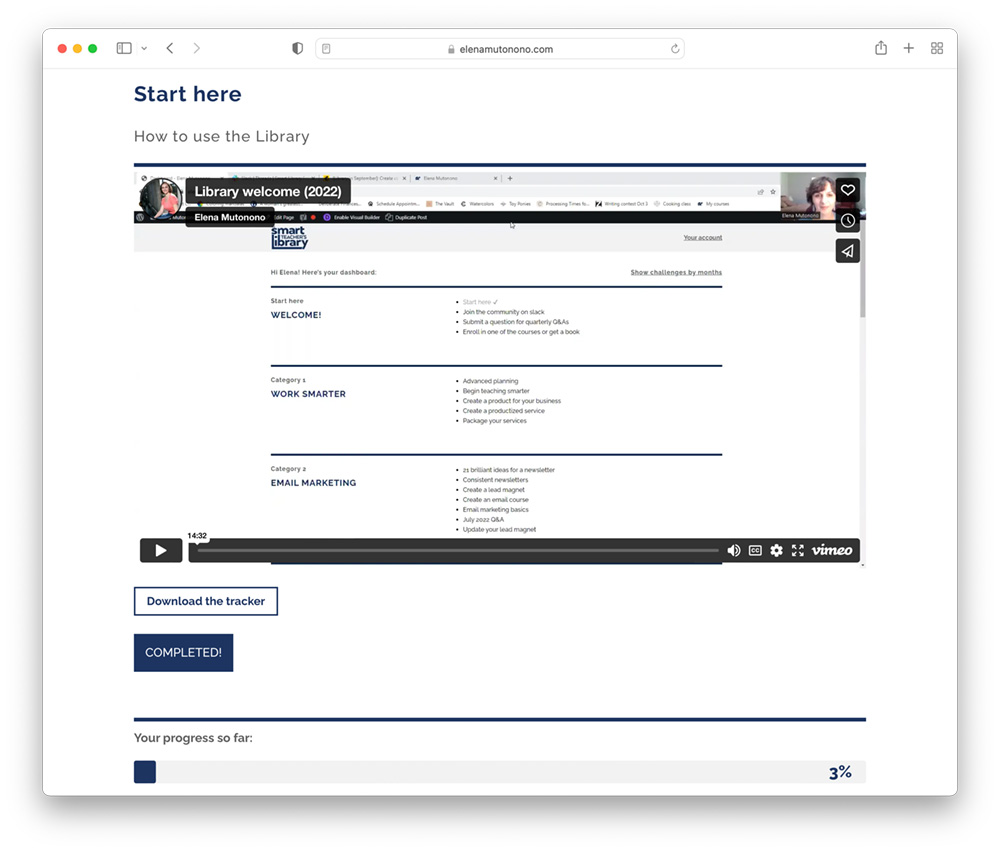
Une page de diffusion de contenu protégé
The Smart Teacher’s Library Tech Stack
We love hearing about all the different tools, plugins, and resources our customers use in their businesses. Between 3:21 – 7:29 in the video, Elena & Jessica reveal the full tech stack they use to run the Smart Teacher’s Library.
What’s amazing is that they’ve designed an elegant system that connects all these tools, so that it doesn’t feel overwhelming for them or their customers. Take a peek and see if you can get some inspiration from their setup.
- Système de gestion de contenu - WordPress
- Hébergement WordPress géré - Volant d'inertie
- Thème - Divi & the Divi Layout Pack pour MemberMouse
- Plugin d'adhésion WordPress - Souris du membre
- Suivi des progrès de l'adhésion - WP Complete
- Plate-forme communautaire d'adhésion - Slack
- Fournisseur de services de courrier électronique - MailChimp
- Hébergement de cours en ligne - Podia
- Hôte vidéo - Vimeo
- Outil de planification du calendrier - Acuité
- Meetings, Events & Webinars - Zoom
- Forms & Surveys - JotForm
- Hôte du fichier - Google Drive
Ressources complémentaires
Transcription complète
Matt : Hey Elena. Hey Jessica. Thank you so much for coming on today and I’m really excited to dive in and be able to showcase your site and talk about all of the amazing things that you’ve done. And how you’ve built your site, how it’s designed, looking at your member dashboard area and really showing people what’s possible for creating their own membership site in a way that’s simple and doable, but still very beautiful and totally functional. So, again, thank you so much for coming on. And Elena, Jessica, if you want to give just a quick background of your business. We did record a full podcast episode with you Elena, so if people are interested in learning more about how you built your business, the full journey you’ve been on you can listen to that episode, but I think a little context would be helpful to get started.
Elena : So, thank you for having us and we’re happy to share and actually show what our membership area looks like. But essentially we have a paid community for online language teachers who want to branch off from the big platforms and want to start their own business. And as we all know when they do that, there’s a lot of learning that goes along with it. And in our community, we provide support system through group coaching, through small materials, tutorials that we release or update every month. And we have a forum where people can ask questions, and we also have an opportunity for people to dive deeper into specific subjects through the courses and books that I have created for them. So, that’s a little overview and Jessica here she’s actually one of the members of the community and now also helping with the design part of it. So, Jessica can say a few things of her experience as a user and then now as a designer because she will be speaking also as the designer today.
Jessica : So, as Elena said, I’ve been part of her community for about three years now I guess, and really enjoyed all the content and the community that she’s created. And I’ve had a little bit of a transition myself, I’m focused more on helping designers tell their story. A lot of them with an ESL background so there is still a language focus, but helping people more with storytelling and that sort of thing. And recently Elena decided she needed someone to help out with her website and that’s something I really enjoy doing, and since I have that design background it was a perfect match.
Matt : Incroyable.
Elena : Nous vous remercions.
Matt : That’s so great and excited to dive in. And today we’re really going to be looking at the full membership experience from the front end of the site, from someone just lands on the homepage to viewing the Smart Teacher’s Library, community, sales page, the checkout process, the member dashboard, and really just taking a play by play look at the experience someone like you becoming a customer goes through to enroll in the membership. But before we get into that, I thought it might be helpful to just give the 30,000-foot view of the technology stack that you’re using because I know that this is something our customers and the people in our audience and community are always really interested in is hearing about the different tools that people use. So, I know that you’re using WordPress and I think you’re on FlyWheel for hosting, is that right?
Elena : Yes, and I will probably get Jessica to talk more about the tools now that she’s been a little familiar with them. But yeah, we’re doing that FlyWheel for hosting yes.
Matt : Vous utilisez le thème Divi et vous disposez du pack de mise en page pour MemberMouse pour styliser les pages principales et tout ce qui s'y rapporte. Quels sont les autres plugins que vous utilisez pour votre site ?
Jessica : Well, we’re using WordPress Complete and that’s a really nice feature because it allows the members to check off the things that they’ve done. So, since Elena’s always adding new content, it really helps you stay organized and keep track of the things you’ve already done and track your progress. I’m trying to think what else.
Elena : We’re also using Vimeo for video. So, some tutorials, not all of them, but some of our tutorials are video based and we’re hosting them on Vimeo. Others I’ve been uploading them as audio as that seems to be a format that people like better these days. So, the most recent content that we are posting would be the workbooks or a script and then the actual audio, which is usually no longer than seven minutes. So, people can download those, and those are hosted inside my Google Drive with the G Suite that we have for my company. So, I think this would be it. These are the main things that we’re using.
Jessica : Et bien sûr, MemberMouse.
Elena : Oui.
Matt : Oui, bien sûr, MemberMouse pour le processus de paiement et la protection du contenu. Et je pense que vous l'avez également intégré à MailChimp, n'est-ce pas ?
Elena : Right, we have MailChimp. That helps us keep everybody on the same list to send out because every month we send out updates for new materials. We also use Acuity Scheduling for our meetings and Zoom. So, Acuity Scheduling just helps our members to sign up for group coaching sessions whenever we have ones, and then they get notifications with the Zoom link. We also use Jotform if people need to just fill out the form or fill out feedback form. We use that not as often, but that’s something that we’ve tried and we enjoyed using that. And there’s also Podia a website that we’re using for in depth courses. So, our content is twofold. We have monthly content that we put out that is themed, for example, email marketing or social media marketing.
And we have a tiny little training that is hosted on my website and within MemberMouse. But then I also have longer and in-depth courses on very specific subjects that people really need like for example, how to create a product or how to build a system around your business. Those are more in depth and I found that it would be easier to host them elsewhere so we’re using Podia for that. But all the links to all those materials are inside our dashboard within MemberMouse on my website. So, if people forget where they need to go, what’s next, they can always click the links inside the dashboard.
Matt : Avez-vous un outil communautaire que vous utilisez également ?
Elena : Yes, we are using Slack for communication. We’ve been using it for five years, I mean, for as long as we’ve had this community and it’s really been helpful. It’s very easy to use, straightforward. I think we tried something else with another when we had an event, but we went back to using Slack because it was just easy.
Matt : Nice. And for someone who’s watching this or listening, this may sound like a lot of different tools to put together, and I think when people start their membership sites or their online businesses, a lot of times you don’t realize how many different components and tools are required. But something that I really like I admire about the way you’ve done things is that when we see the experience, it’s all very simple and very streamlined and accessible. And for the user it doesn’t seem overwhelming, and I think it makes for a really great member experience when they actually log in and see your dashboard and go through the content and everything is super organized. And I imagine it also makes things simpler for you to manage. So, I think without further ado, we should take a look at the site and show people what the process is like for someone to get to your website, enter the funnel, go to your sales page, check out, look at the front-end experience, and then we’ll look at what the user experience is LIKE in the actual paid private members area.
Elena : And also, just to reiterate what you were saying about the number of software that we’re using, I mean, it seems like it’s overwhelming when we’re just listing them off, but really we just added what we needed as we needed stuff. So, in the very beginning it was like, okay, we need a place, we need to host materials somewhere and we need a forum somewhere. So, that’s what it was like in the very beginning. We added group coaching sessions a couple of years into it because that was something that I felt like people really needed, and so we had to resolve that problem by adding another additional piece of software.
So, it’s not like you start something and you’re like, okay, now I need a list of 20 things. So, in the beginning it was just two things and it was added over time so I just wanted to give people that idea. So, when they look at it and they think, oh wow, they put it all together. I mean, we’ve been doing this, we’ve been running this community for five years and there’s been multiple changes over almost every year we’ve upgraded, updated, changed plugins, added plugins to make the user experience the way it is right now.
Matt : And I know that that’s something I think you and Eric talked about on the podcast, which was the business will let you know when it’s time to grow when you need new systems, you need new tools. So, if you’re just getting started out and you’re watching this, don’t feel like you have to just imitate this model or use all of these tools. It’s about finding what works for you now and then adapting and like you said, upgrading over time as needed. So, yeah, this is the site.
Elena : Oui.
Matt : Encore une fois, j'adore son aspect. J'aime la façon dont vous l'avez conçu avec Divi. La plupart des gens découvrent votre site par le biais des médias sociaux et de l'e-mail, n'est-ce pas ?
Elena : Yes, mainly it’s social media. I’m on Instagram and I also have a podcast and so people will find me that way. And then I have a blog, and because I’ve had this website for six years it usually ranks high in Google searches, specifically the ones pertaining to online language teaching. So, because I have lots of blog posts, whenever people are searching for something very specific they will find my blog post and then they get on my mailing list. The same way is through the podcast. And then there are two ways to get on the mailing list, whether they’re on the blog post then we have a little form that they can fill out and sign up for the newsletter. Or if they just get on the website, then they go here to my Smart Teacher’s Kit, which is the lead magnet, the so-called lead magnet.
People sign up, they receive the Smart Teacher’s Kit that helps online language teachers learn how to teach languages without one-to-one classes, like to give them a variety of ideas. So, that’s the page, and they sign up here and it hooks up to MailChimp and in MailChimp then they receive this Smart Teacher’s Kit. It talks about what I do and also talks about how I help teachers. And it comes with a series of lessons that actually are based on the Smart Teacher’s Kit. So, the Smart Teacher’s Kit talks about different ways to teach languages online, and then the following sequence repeats this thing with more maybe detail and stuff. And there’s always a little note that people can respond to me, and of course I talk about the Smart Teacher’s library because this is a part of my work is the community.
And we launch the community twice a year in February and in September, and so usually people know about that when they sign up. And when they learn about the community and they go on the sales page and it’s not launch time, there’s a form where they can get on the waiting list and learn more about it. Then they will actually get more information about library and they can take a look at some of the materials and so forth, but that’s what it looks like. This is the Smart Teacher’s Kit, and then here’s Smart Teacher’s library and I think the community, the actual community page. And that’s what it looks like when it’s launch time.
Matt : Vous êtes récemment passé d'un modèle ouvert à un modèle fermé à un modèle toujours ouvert à l'inscription ?
Elena : Yeah, it was always open in the beginning because I didn’t know what was better. Over time, I figured that it’s better to have open close enrollment. And initially I was doing it every other month, but then I got to a point that I’m going to do it twice a year and that will allow me to prepare my audience and also give people the time to learn more about the community and make a commitment. We’ve also switched from recurring payments to lifetime payments, which is something that we can talk about another time, but essentially-
Matt : Cela pourrait faire l'objet d'un épisode à part entière.
Elena : Yeah, but the idea is it’s a bigger investment this time so people need time to think. So, bringing everybody in around the same time helps us, my team, to update all the records, to welcome people, to bring everybody together and have give the best user experience that we can as opposed to if people were just signing up on their own. So, bringing them at the same time we have a little party after enrollment closes and the members, current members can meet the new members and they can chat. And we have a little, the same, maybe very similar to what we’re having introduction where I take people inside and I show to them how the dashboard works and what they can do with the materials and so forth. But that’s the sales page and it’s taken me several years to get to a point where the sales page works. Initially I just wrote what I thought had to be on the sales page.
After a couple of years, I hired someone and this person rewrote the sales page. And then a year later I hired yet somebody else because the sales page was not performing and the person that I hired, she was able to not only rewrite the sales page, but restructure it in a way that helped people understand what the community is about. And that’s what we have right now. So, we have the training, the challenge every month, which is really our, we call it a challenge, but it’s a theme. And we have personal feedback that comes from the forum, and we have these materials digital, the newsletter that comes out every month with my reports. And then we have coaching sessions every month and prerecorded Q&A. So, quarterly teachers can send me their questions using Jotform like we talked about and that’s another way for us to use it and then I record a video and I share it on the inside. And then of course we have the courses. And so it’s all listed here and then there are payment options.
Matt : This is great. Yeah, I mean we could do a whole ‘nother video about just creating a sales page, everything that goes into that. But for this training, I think looking at what the checkout process is like and then showing what the experience of somebody going from being a lead to a customer and getting immediate access to the dashboard looks like. You’re using MemberMouse for the checkout pages, correct?
Elena : Yes. So, here’s the way the checkout page looks.
Matt : Vous avez un service de test en marche.
Elena : We’re using a test service, but it looks similar. And so, we can…
Matt : Before you submit the order I’ll just point out a question we get a lot is how do I style my checkout page? Because when you just have the default MemberMouse checkout page it conforms to the style of your theme, but here you’re using the Divi layout pack, the free Divi layout pack we have for MemberMouse which applies this more modern styling to this page. So, if anybody watching if you’re also using Divi or you’re thinking about it, you can get the Divi layout pack, which will give you a checkout page that looks very similar to this. And it gives you more control over the way the page looks without having to design one yourself with a page builder or custom code one. So, this is a really easy way to get a great looking page like this. So, it’s cool to see it in the wild.
Elena : And actually, Jessica was the one to set it up to look this way and to add these three payment buttons that we have that lead to different checkout options I guess. So, Jessica, if you have something to add to this, but that’s pretty straightforward otherwise I can go through checkout.
Jessica : If you are using Divi as Matt was saying, it gives you a lot of control over how you want it to look. And so having that option to style things the way you want is really nice if you’re willing to take the time to learn the system.
Elena : Okay. So, we’re going submit order and… Okay. So, after it checks and you get the checkout, then this is the page, the thank you page.
Matt : Page de confirmation.
Elena : Oui, c'est ça. Et lorsque vous êtes sur la page, vous pouvez vous connecter en utilisant votre...
Matt : Je sais que Jessica vous a déjà posé une question à ce sujet, mais s'agit-il d'une barre d'accueil en haut ou d'un bouton de connexion situé au-dessus de l'en-tête ?
Jessica : Yeah, that is some custom code there. And I’m in the process of actually figuring out how to change that because it is a complex site and I’ve only been working with Elena for a month or two. Sometimes I have to do a little digging to figure out how things were created, but I mean, the nice thing about Divi is once I figure out how it should be it’s actually pretty easy to make the changes. It’s just sometimes figuring out how it was designed by whoever came before.
Matt : C'est bien. Nous pouvons maintenant montrer le processus de connexion.
Elena : D'accord, continuez. Oh, je suis déjà connecté.
Matt : So, that’s fine. Yeah.
Elena : Et nous pouvons aller voir le tableau de bord. Et nous sommes ici.
Matt : Nice. And yeah, this is what I was really excited to show everyone because the first time you showed me this and you’re talking about your thinking and strategies behind the design and learning design, I just thought this was so clean and so elegant while also being simple and approachable. That this is something that I think a lot of the people who use MemberMouse and that are building membership sites can emulate because it can be tricky to figure out exactly how to design your dashboard, but this makes things very clear for people. So, if you want to share a bit about how you came to this design and how everything’s set up, that’d be awesome.
Elena : At first, I am just going to talk about the philosophy behind the design, and then of course Jessica will talk about the details. But one of the things I think we’re good at as teachers is they call this learning design, just trying to figure out the best way to create content and deliver content such a way that your client isn’t overwhelmed. Now it does not come immediately, it comes with the years of practice. And so my idea was for creating this dashboard and giving it this clean look was exactly based on this philosophy that I need to give people just enough materials so that they’re not overwhelmed, they feel that this is doable and they are excited about engaging with the material and actually implementing it. So, therefore, we try not to add materials indiscriminately. So, we just are very specific, we have about 10 categories here. And so, we think it through like what is very important right now? And then we also go back and update the materials from previous years so that way the structure remains.
So, it doesn’t look like, oh, now I have all these new things. It’s pretty much similar. We add certain things, we let people know that something has been updated, but the look still remains the same so that a person is not overwhelmed. It’s very easy when you have websites where you share materials to just give people a lot, and that’s where I guess our teacher’s wisdom comes in and experience that giving people a lot doesn’t always mean that it’s going to help them. It actually might have the adverse effect. But here in the beginning we have the start here button and we just have a little video with introducing people to the membership area pretty much. And I encourage people to download the tracker, which is really a simple sheet of paper that I created for people to stay on top of how much time they’re putting into the community. There’s no requirement. We encourage people to just check in once or twice a week to see what’s new and connect with their peers. And then once you’re done, then you click mark complete and it’s cool because then at the bottom…
Matt : Oh, that’s so cool. Yeah.
Elena : Yes. And the dopamine of this so you’re excited. The same thing, we have community.
Matt : So, that’s where people get the link to join your private Slack group?
Elena : To join, yes. So, that’s what it looks like. And then you can mark as complete and then it goes back. Then we have quarterly Q&As, and that’s where you can go and it takes you to a Jotform and people can submit that and then you add your question and then you can go back to the dashboard. There’s several things like I said, that’s what is a part of it. Then you can go and enroll in the courses so there’s the courses where…
Matt : Les personnes qui rejoignent la communauté bénéficient-elles de tous vos cours gratuitement ou d'un seul ?
Elena : Oui, tous les cours et tous les livres sont gratuits. Donc, ils cliquent pour les obtenir et ils vont sur le site web de Podia et ils peuvent le faire. Vous pouvez probablement brouiller cela.
Matt : Yes, I’ll blur that out as well.
Elena : Oui, brouillez mon adresse et l'adresse de ma carte de crédit de toute façon.
Yes. But here’s what it looks like the actual Podia page, which is really nice because Podia allows you to make it look like it’s a part of your website, which is…
Matt : Absolutely. And so, this is like an alternative to using a tool like LearnDash, which would be a WordPress based course tool where you have the progress and the modules and lessons and quizzes and all of that. It’s nice because you get to put a more complex thing on another site and not slow down your hosting or overcomplicate, anything like that.
Elena : Right. But for us, those are different things and I wanted to keep them separate so that people know, okay, so here’s what we’re doing on a monthly basis, and that is something they can choose to take later or anytime they want to. And then they can join our next group coaching session. And so it’s very easy, what you do is just click here and you sign up.
Matt : Oh, c'est bien. Et c'est Acuity ?
Elena : Yes, that’s in Acuity and they sign up for a group coaching session. They get reminders one day before and maybe one hour before, but this one changes every month depending on what our topic is. But it’s the same topic for the monthly theme and obviously monthly group coaching session the same. So, back to dashboard. So, then we have all these categories and maybe Jessica can talk about the actual structure and how we put it together to look this way.
Jessica : Sure. So, one of the cool things about the way this is organized I feel as a member is that there’s two different ways to look at the dashboard. So, this is the way I usually look at it by categories. So, you can see she’s got the start here, stuff up in the welcome, and then each category is like a theme. So, when I’m updating this anytime there’s new content or every once in a while, if we reorganize a little bit basically each of the bullet points there is a new page that I create in WordPress using Divi. And there’s a place where you can just at the bottom choose what category it belongs to, and then it automatically puts it where it belongs and you can set it to be an alphabetical order and that’s how we have it right now. So, it does all that for you and keeps it nice and tidy and manageable so that the audience doesn’t get overwhelmed like we were saying.
But then the other part of it is that you can also view the dashboard by the month because Elena as she said, has these monthly challenges that we do. And so, it helps you to focus each month if you want to work on the same thing as everybody else in the group, you can look at the challenges by month. And so, it’s all the same stuff, it’s just that each month there’s one thing that we’re highlighting and so we do that with a tag. So, each of those pages that I create has both a category and a tag with the month. So, it’s very easy so then each month I just update this, I add a new row, I just change a little piece of code that tells what the new tag should be so November, 2022 and it just appears on its own. So, it’s a great system if you like having these two different options.
Matt : Yeah, that is amazing. I love that because like you said, it gives people two ways to participate and maybe people do both ways it’s not necessarily one or the other. And it sounds like it’s actually pretty simple for you to manage on the back end with WordPress. I’ll note too for the people who may be wondering about how all this content is protected, you’re using MemberMouse to protect this category of pages, the smart library pages, and associate it with the paid membership level or bundle or whatever it is you’re using to protect the content, that’s right?
Jessica : Exactly, yeah. So, each time I add one of these new content pages, there’s just a little section integrated with MemberMouse where I can go in and give access to the people who are part of the community. So, different membership levels or if you had some free stuff, you can choose whether or not those folks can see that content. Since we have a lifetime membership now, it’s more simplified, but MemberMouse gives that flexibility.
Matt : C'est très bien. Et je pense qu'en bas, vous avez toujours cette barre d'achèvement qui montre votre progression tout au long du cours.
Jessica : Exactement.
Matt : Nice. That’s great. And previously we had looked at you had certain modules here, certain sections that had videos. That’s where the Vimeo hosting comes in as protecting those videos on these pages and having Vimeo you’re uploading them there and then you’re just embedding them directly into these pages, right?
Elena : Oui.
Jessica : Exactly. There’s just a little piece of code that I can put into the… There’s a code module in Divi, so I just stick that Vimeo code in and it’s very easy.
Elena : I like these, these are our reflection journals. That’s another thing that we want to encourage people. For example, they can spend some time in front of the computer working on some of these challenges. Although a lot of stuff that we offer is printable, we also have reflection journals and those are people can just open this, they can download the journal. That’s what it looks like. It’s from Google Drive for example, in creativity. It’s very simple and we encourage people to do that for a weekend for example, that digital detox. So, that is a cool thing and that’s one of the things that we also want teachers to learn that you can learn sitting in front of the computer. You can also learn by downloading, printing out and going and sitting somewhere in your cozy spot in the house to take a break. So, that’s the philosophy behind it, trying to make a whole variety of materials, not just one specific way.
And of course, MemberMouse allows us to do all this and for it to look pretty and look like something is doable like that. That is the whole point, I wanted for people to join and not feel like, oh, now I have to do all this. And that’s also a part of our marketing and my marketing and also educating my audience about our membership area is that it’s a library. It’s not an online course, you are not required to go from A to Z. And I always tell people when you have a library in your neighborhood, you never tell yourself, oh, I need to go and read all the books in the library. That’s nonsense. You don’t go to the library to read all the books, but you need the library there so that when you need something it’s there. And that’s the whole point of our community and hence it’s called the library.
Matt : And you had mentioned earlier too that you don’t just have video content and downloads, but you were doing some more audio programs. Can we see an example of what the audio might look like in here?
Elena : Okay. I’m trying to remember which one we had just fairly recently.
Matt : I’m putting you on the spot.
Elena : Oui.
Matt : Because there’s so much here, but just from a visual standpoint and an experience standpoint it doesn’t seem overwhelming. It seems like very organized, very orderly, and very doable, where like you said, you’re not logging in and making people feel like, it’s a second job to go through all of this. It’s kind of like you said a library. Okay, I need to work on my website, or I need to get a little bit better at email marketing, or I’m curious about different client attraction methods, getting what they need when they need it. But it’s all here.
Elena : Oui, c'est vrai.
Jessica : Elena, je pense que les ventes des fêtes de fin d'année que nous venons d'ajouter pour le mois de novembre ont une composante audio.
Elena : Yes. I just was looking, I’m trying to edit, it’s taking its sweet time. But we’ll definitely get there at some point. Okay. Yeah, there you go. So, that’s what it looks like. We have a worksheet and we’ve got the script, first of all. So, there’s an option, people can listen to the audio and the audio is just a simple Google Drive. People can download it easily. If they don’t want to listen to the audio, there’s a script. They can go and read the script, and the script is really fast.
Matt : C'est une bonne chose.
Elena : So, I trace to make them very short. So, it’s never more than two pages, the script. And once they go through the script, there’s a worksheet that they can look at and work on.
Matt : Bien sûr. Autre chose ?
Elena : Once you’re done then you mark complete.
Matt : Et cette barre en bas se met à jour. Et cette barre en bas se met à jour, ce qui a quelque chose de très satisfaisant.
Elena : I know. It’s really good. Yeah.
Matt : Quel retour d'information avez-vous obtenu de vos membres sur leur expérience au sein de la communauté ?
Elena : I mean, everything that we have implemented, all the changes because the way it looks right now compared to what it looked like in the beginning is definitely different. But all the changes that we have implemented they were based on the feedback. So, initially people were complaining to us at the very beginning when we were not using MemberMouse that it was very hard for them, just the user experience of logging in was really difficult. Like trying to get the password and then forget the password, and then not being able to get the email with notifications. So, that prompted us to go the MemberMouse route, and I have really been so excited and so grateful for this software because nobody has ever asked me how do I do? And if people do ask me their password or they need to change the password and something it doesn’t happen, then I can do it on my side. And it always works. So, to know that it’s possible and to know also that you have very responsive support this has been a game changer.
Matt : Got it. That’s amazing. That’s so great to hear. I guess connect to that, maybe we can take a peek at your My Account page, if someone did want to update their address or their password or their credit card in here. This looks great.
Elena : That’s what it looks like. And then people can change and take a look and then go back to dashboard and all. I always listen in on what people are saying directly or indirectly, but I know that shorter content and bite size content is something that people really appreciate. That was one of the things that really compelled me to switch from even videos. Even though videos were shorter not everybody had an opportunity to watch a video, but now that I have a script and an audio people have a choice they can read and it takes them very… I mean, it’s very fast, or they can listen to the audio and that is another option. I don’t know, Jessica, now you’re going to put your other hat as a member and tell me what your user experience has been.
Jessica : Yeah, it’s nice. I mean, I think especially since Elena has stood her podcast I’ve noticed there’s been more of a switch to including more audio stuff and it’s nice that way it suits different people’s needs. Some people really like video, but some people want to be able to listen while they’re doing other things or not have to watch and certainly having the choice to read. I know for me, if I’m doing something sometimes I don’t feel like listening or I’m not in a situation where I can listen. Anytime I have the opportunity to just read something that ensures I will do it right then and not be like, oh, I need to do this later when I can listen to it or watch it, and then I forget. So, just having that flexibility makes it more likely that I’m going to do whatever the task I came there to do and not have any reason to put it off. So, that’s nice.
Matt : That’s amazing. So, for anybody who is watching this that is in the process or wants to build a similar type of experience or site, both of you I’d be really curious to hear what advice you have for them about designing the user experience, designing the learning experience from your standpoint as business owners, but also as teachers? Because I think you’ve created something so great here and have a lot of wisdom to share.
Elena : Jessica, si vous le voulez bien, allez-y.
Jessica : Sure. Well, I would say maybe two things. From the content side what Elena was saying, I think it’s really easy as teachers to just be like, “Here’s everything I know and just hit your audience with so much.” I know I’m guilty of that and I think all of us start that way. And Elena’s extremely prolific, so I’m sure it’s hard for her too, but because it’s so well organized and bite sized it feels manageable. And so having this kind of a structure and having the option for the little checks and knowing what you’ve completed really helps. And so I think thinking through that how to manage your content and make it easy for your audience and getting feedback from your audience is a great way to start.
And then from the design, side some folks are intimidated by using WordPress and Divi just because there’s so much you can do. I enjoy that kind of stuff, and so for me it’s a fun challenge to figure out the better ways of doing things. And they both have great support, so I feel like I can always figure out a way to do what it is that I want to do or what Elena wants to do. So, to me it’s worth investing in that to make sure you get the best experience for your audience that you can.
Matt : Yeah, I think that’s something that is both attractive and intimidating about using WordPress to build your website and your membership site and your online business. There’s a lot of other platforms out there that are more templated and maybe quicker to implement straight of the box, but then ultimately can become very limiting because you’re not able to create your vision and design the type of experience that you want. The other side is with WordPress you have full control and it’s entirely up to you essentially. So, I think knowing which type of personality you have or just knowing what you’re getting into before you get started is really helpful. But that’s cool to hear that you are attracted to that challenge and enjoy the process of bringing your vision to life versus just getting something up there.
Elena : J'ajouterais probablement que, du point de vue de la conception de l'apprentissage, moins il y a de choses à faire, mieux c'est, et au début, j'essayais de faire trop de choses et d'offrir trop de contenus à thèmes différents. Au début, j'essayais de faire trop de choses et d'offrir trop de contenus thématiques différents. Une partie de mon travail portait donc sur l'apprentissage ou l'enseignement des langues, et sur les méthodes d'enseignement, par exemple comment enseigner telle ou telle partie de la langue et ainsi de suite. Mais avec le temps, j'ai réalisé que ce qui est vraiment important pour moi, ce sont les professeurs de langues, ils savent comment enseigner les langues, je dois retirer tout le contenu qui a à voir avec cela et me concentrer sur l'aspect commercial parce que c'est ce qui est important. Et même si certains enseignants m'ont dit : "Pouvez-vous nous enseigner ceci ou cela ?", je leur ai simplement dit que nous ne faisions qu'enseigner les langues. Je leur ai simplement dit que nous nous concentrions uniquement sur l'aspect commercial de la gestion d'une entreprise d'enseignement en ligne.
And so, that helped me pull out all those materials and go through and sift through the materials that did not work with my vision anymore. So, that’s probably important. And then again, less is more not to be afraid to offer less. And for me personally, because when I started a membership site I knew I needed to have help and so it’s okay. So, I had the idea that I will be able to bring people into the community and make it sustainable so I can afford to have someone come in and help me with the design side of it. Something that is probably not my strong suit, and it’s something that I really don’t want to think much about, I would rather focus on marketing and bringing people in. So, also realizing, recognizing your strengths and if this is the route that you want to go. You can find help and you can start small and hiring someone to help you get started and walk you through it is possible. And if you have a good enough audience or you have built a good enough audience you can do it. So, just not being afraid to ask for help because then it creates this I now work as a team.
So, if something doesn’t work quite right, I don’t feel overwhelmed that now I need to strop and drop everything and try to solve it. I can go to Jessica and say, “I don’t know why this thing isn’t working. Can you check?” And then she goes and checks it and so that really works well. We also have a web developer who just makes sure that all the plugins are friendly to each other so that’s another side of it, but he comes in and he checks things once a week. It seems overwhelming, but in the end if everybody focuses on the task that they’re best gifted at the result is your community is growing, you have new people, you have money coming in, and you’re able to then reinvest and improve and people are able to bring their friends and it doesn’t look ugly. It’s just all those good things.
Matt : Amazing. Thank you so much for sharing that. I think there’s so much packed in here that people can learn from, and I appreciate both of you coming on today and giving us a tour of your site. Are there any final things you want to show off before we wrap up?
Elena : Je pense que nous nous sommes bien débrouillés aujourd'hui.
Matt : Oui, je pense que c'est le cas. Nous avons atteint tous les points du plan.
Elena : Merci d'avoir créé ce schéma, il m'a été utile, et j'espérais qu'il ferait l'objet d'une bonne vidéo ou d'un article de blog, ou les deux. Ce serait génial.
Matt : Absolument. Elena, Jessica, merci beaucoup d'être venues aujourd'hui.
Elena : Merci de nous avoir invités.
Matt : Bien entendu. Vous pouvez partager toutes les ressources que vous souhaitez ou nous pouvons mettre des liens à partir de l'article de blog.
Elena : Oui, il y aura évidemment mon site web elenamutonono.com. Vous pouvez naviguer sur le site et consulter notre page, le podcast et d'autres choses. Et puis Jessica a son propre site web.
Jessica : Le mien est jessgaednercoaching.com. Mon nom est Jess Gardner. Et si vous avez des questions sur Divi ou sur le design, n'hésitez pas à m'envoyer un email.
Matt : And you still got to make that course about how to create your own amazing, colorful background because I’m telling it’s not as simple as you made it out to be.
Jessica : Okay, I’ll do that.
Elena : Il faut absolument qu'on se réunisse, qu'on parle de l'aspect adhésion, de l'adhésion récurrente par rapport à l'adhésion à vie. Ce sera donc...
Matt : I think probably a good second podcast episode. And maybe next year we’ll have you back on the podcast too to talk about that transition because again, another thing that people in our world are very curious about what is better continually open, evergreen models, or twice a year launches? And those people are on both sides and I think that depending on your business, both can work though one may be better for your sanity or for your revenue. So, yeah, big topic we can definitely explore that in the future.
Elena : Oui, c'est vrai. Je vous remercie. Merci beaucoup.
Jessica : Génial.
Elena : That’s going to be coming and I’m looking forward to it.
Matt : Bien entendu. Merci.
Conclusion
Thank you so much for watching this training with Elena & Jessica from the Smart Teacher’s Library. We hope it’s been helpful, informative, and inspirational to you. It’s our mission here at MemberMouse to help you build a powerful and profitable membership site – just like Elena.
As you watched this training, did any questions come up for you? Anything you’d like more information about? Join our discussion and let us know in the comments below. We’d love to hear from you.


Blair Williams
Compte d'employé créé par MemberMouse




 FR
FR  EN
EN  ES
ES  DE
DE  PT
PT 


