 Blog
Blog Podcast
 Unterstützung
 Kunden-Login
Canceling a bundle will cancel any related subscription for that bundle but will not cancel the member’s account. When a bundle on a member’s account is canceled, they’ll be able to log in, but they won’t be able to access any content that’s protected by the canceled bundle. If the bundle did not have any subscription payments, then the member’s bundle will move to a gestrichen Zustand sofort.
Handelt es sich bei dem gekündigten Paket jedoch um ein Abonnement, wird das Kündigungsdatum zum Zeitpunkt der Beantragung der Kündigung des Kontos festgelegt und hängt vom Stand des Abonnements ab.
For example, if their subscription rebills monthly and they cancel halfway through the month, their cancellation date will be set for approximately 15 days in the future. If their subscription rebills annually and they cancel 3 months in, their cancellation date will be set for approximately 9 months in the future. In this situation, the member’s bundle will enter a Anstehende Annullierung Status. Bitte lesen Sie diesen Artikel, um Erfahren Sie mehr über die verschiedenen Mitgliedsstatus.
Hinweis: Ein Mitglied kann seine eigenen Pakete auf der Seite Mein Konto im Bereich Abonnements kündigen.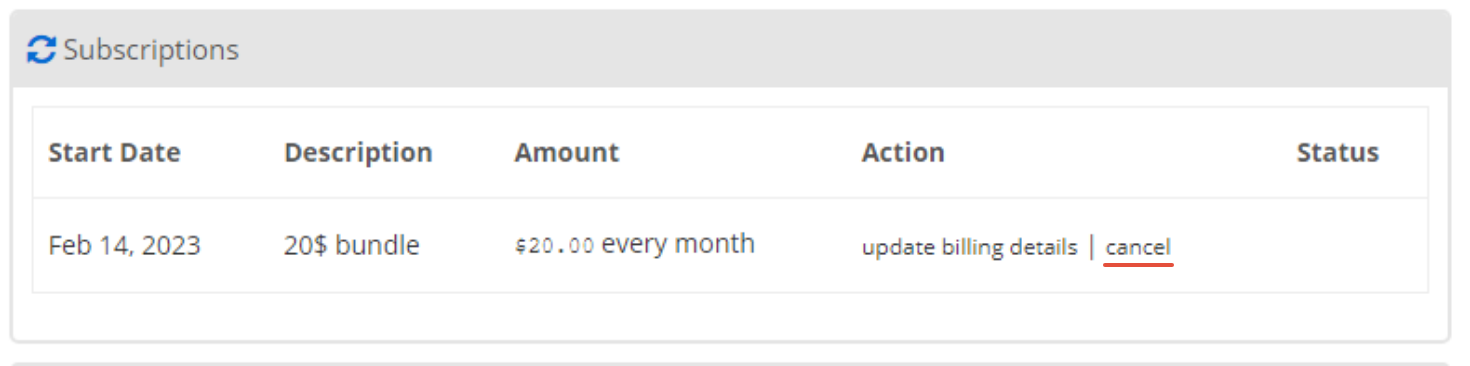
So kündigen Sie ein Mitgliederpaket manuell
- Gehe zu MitgliedMaus > Mitglieder verwalten and find the member you want to change the expiration date for. Click on this member’s email address or the edit icon on the right in order to view the details for that member.
- Klicken Sie auf das Zugangsrechte tab.
- Suchen Sie das Bündel, das Sie stornieren möchten, in der Liste Bündel und klicken Sie auf das Symbol Abbrechen :

- Klicken Sie auf ok, wenn das Popup-Fenster Sie zur Bestätigung auffordert:

- Sie werden sehen, dass das Bündel nun entweder als Abgesagt oder als Die Annullierung steht noch aus. Wenn es sich Anstehende Annullierungsehen Sie auch das Datum, an dem das Paket vollständig gekündigt wird.
- Wenn Sie das Datum ändern müssen, klicken Sie auf das Bearbeitungssymbol neben dem Paket:

- Klicken Sie auf das Datumsfeld und navigieren Sie zu dem neuen Ablaufdatum in dem sich öffnenden Kalender:

- Klicken Sie auf die Speichern Sie button to save your changes. After changing a bundle’s expiration date, the bundle status will immediately reflect whether or not it’s expired based on the new date.

 DE
DE  EN
EN  ES
ES  FR
FR  PT
PT 


