 Blog
Blog Podcast
 Soutien
 Connexion client
Si vous utilisez le plan Pro ou un plan supérieur, vous pouvez modifier les informations relatives à l'affiliation sur une transaction existante.
Tout d'abord, rendez-vous sur le site Gérer les transactions screen for any member and then click the edit ‘pencil’ icon on the appropriate transaction. A pop up window will be displayed where you can specify the affiliate and sub-affiliate ID for the transaction. If the transaction is associated with a subscription then changing the affiliate info will be applied to the current transaction and all future rebills on the subscription.
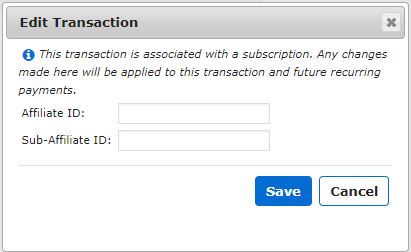
Cliquez sur le bouton Économiser pour enregistrer vos modifications.
Once you’ve changed the affiliate info on a transaction you’ll be given the opportunity to send a commission request to the affiliate provider you’re integrated with by clicking the ‘blue send’ icon in the Actions column.
This option is only available when you’re integrated with an fournisseur d'affiliation qui prend en charge le suivi des commissions.
Remarque : Si l'icône d'édition est grisée, cela signifie que vous n'êtes pas sur le plan Pro ou supérieur.

 FR
FR  EN
EN  ES
ES  DE
DE  PT
PT 


