 Blog
Blog Podcast
 Suporte
 Login do cliente
Se você estiver no Plano Pro ou superior, poderá ajustar as informações de afiliado em uma transação existente.
Primeiro, vá para a seção Gerenciar transações screen for any member and then click the edit ‘pencil’ icon on the appropriate transaction. A pop up window will be displayed where you can specify the affiliate and sub-affiliate ID for the transaction. If the transaction is associated with a subscription then changing the affiliate info will be applied to the current transaction and all future rebills on the subscription.
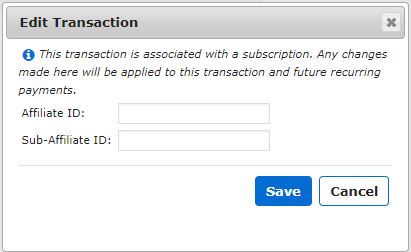
Clique no botão Salvar para salvar suas alterações.
Once you’ve changed the affiliate info on a transaction you’ll be given the opportunity to send a commission request to the affiliate provider you’re integrated with by clicking the ‘blue send’ icon in the Actions column.
This option is only available when you’re integrated with an provedor afiliado que oferece suporte ao rastreamento de comissões.
Observação: Se o ícone de edição estiver acinzentado, isso significa que você não está no Plano Pro ou superior.

 PT
PT  EN
EN  ES
ES  DE
DE  FR
FR 


