 Blog
Blog Podcast
 Suporte
 Login do cliente
bbPress was built by the creators of WordPress and provides forum functionality for your WordPress site. Using the bbPress extension, you’ll be able to protect bbPress forums based on a member’s access rights in MemberMouse. In order to use the bbPress extension plugin both bbPress and MemberMouse must be installed and activated.
Siga as etapas abaixo para usar a extensão bbPress:
- Download, install, and activate the bbPress extension plugin from this direct download.
- Certifique-se de que o plug-in bbPress esteja ativado e clique no botão Fóruns menu.
- Crie um novo fórum ou clique em um fórum existente que você deseja proteger.
- No lado direito da página, localize a opção Proteção do Fórum MM módulo.

- Marque a caixa para ativar a proteção neste fórum.
- Abaixo de Conceder acesso aos níveis de associação, select the membership level(s) you want to be able to access this forum. You can select multiple membership levels by using ctrl + click on a PC and (Command key) + click on a Mac.

- Abaixo de Conceder acesso a pacotes, select the bundle(s) you want to be able to access this forum. You can select multiple bundles by using ctrl + click on a PC and (Command key) + click on a Mac.

- Em seguida, você pode especificar um URL para o qual redirecionar usuários não autorizados se eles tentarem acessar esse fórum. Verifique o Redirecionar usuários não autorizados e insira um URL.
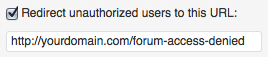
- Clique no botão Atualização para salvar suas configurações.
Now that you’ve protected this forum, when unauthorized users visit the forum index page they’ll see a ‘lock’ icon next to the forums they don’t have access to and if they attempt to view protected forums they’ll be redirected to the URL configured in the forum protection settings.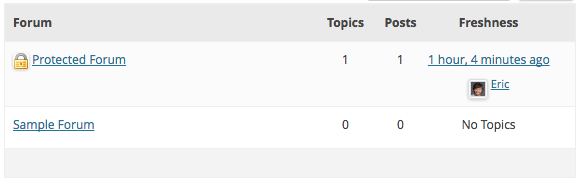
Exclusão de um membro
Se você optar por excluir um membro do MemberMouse who has made posts to your bbPress forums, their posts/forums/replies/comments will all remain on the website. The only effect is that the original author of those posts/forums/replies/comments gets switched to “Anonymous”.

 PT
PT  EN
EN  ES
ES  DE
DE  FR
FR 


