 Blog
Blog Podcast
 Suporte
 Login do cliente
If your test purchases aren’t showing up in your chosen payment service, one of the first things to check is that the Test Payment Service is de-activated, or at least have it set to ‘On Demand’. You can check this by going to MembroMouse > Configurações de pagamento e clique no ícone Métodos de pagamento guia.
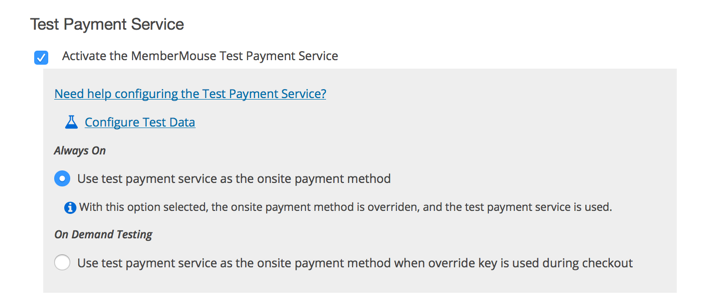
When your Test Payment Service is active and configured to be ‘Always On’ this means that the test payment service is overriding any other onsite payment methods. You can confirm if this is what’s happening by going to the Procurar transações page and if all the transactions have a little test beaker icon next to them, this means it’s going through the test process.
De-activating the test payment service or changing the test payment service mode to ‘On Demand’ will allow you to test the payment provider.
OBSERVAÇÃO: O primeiro pagamento das assinaturas de avaliação gratuita será não são exibidos como uma transação, pois nenhum pagamento é feito durante o período de avaliação.

 PT
PT  EN
EN  ES
ES  DE
DE  FR
FR 


