 Blog
Blog Podcast
 Unterstützung
 Kunden-Login
Wenn Sie MemberMouse so konfiguriert haben, dass doppelte Abonnements zulassen, it’s possible that customers may accidentally sign up for the same subscription two or more times.
Das Tool für doppelte Abonnements zeigt eine vollständige Liste aller Mitglieder in Ihrem System an, die über doppelte Abonnements verfügen, die mit ihrem Konto verknüpft sind, und ermöglicht es Ihnen, doppelte Abonnements einzeln zu kündigen.
Um zum Tool für doppelte Abonnements zu gelangen, gehen Sie im MemberMouse-Menü zu Allgemeine Einstellungen und klicken Sie dann auf das Symbol Doppelte Abonnements tab.
Die folgende Abbildung zeigt ein Beispiel für die Tabelle der doppelten Abonnements.
Here you see a complete list of duplicate subscriptions in your system grouped by member account. Each row in the table represents a currently active subscription on the member’s account. Subscriptions are grouped by member for easy viewing. Consult the Doppelte Abo-Spalten Tabelle unten, um mehr zu erfahren.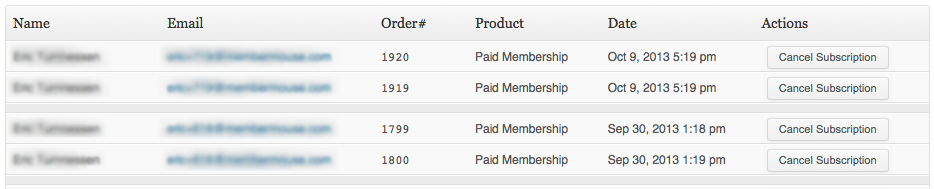
Doppelte Abo-Spalten
| Name | This is the customer’s full name. |
| This is the customer’s email. Clicking on the email address will take you to the transactions tab of the member details area so you can see more details about the transactions that have occurred on this customer’s account. | |
| Bestellung# | Dies ist die mit dem Abonnement verbundene Bestellnummer. |
| Produkt | Dies ist der Name des Abonnementprodukts. |
| Datum | Dies ist das Datum, an dem die Bestellung für das Abonnementprodukt aufgegeben wurde. |
| Aktions | Klicken Sie auf die Abonnements kündigen um das Abonnement zu kündigen. Dadurch wird verhindert, dass dem Kunden dieses Abonnement in Zukunft in Rechnung gestellt wird. If after you cancel a subscription, there’s only one active subscription left on the customer’s account for that particular subscription product, the customer won’t show up in the duplicate subscriptions view anymore because all duplicates have been canceled. Anmerkung: While canceling duplicate subscriptions you may want to consult the customer’s transaction history to see if they should be issued any refunds. You can do this quickly by clicking on their email address. |

 DE
DE  EN
EN  ES
ES  FR
FR  PT
PT 


