 Blog
Blog Podcast
 Suporte
 Login do cliente

How To Create a Certification Program for Your Employees
Learn how to easily build a secure certification program for employees with MemberMouse to boost skills, retention, and business growth.
When you bring a new person onto your team, you want them to succeed. You want them to feel confident, capable, and ready to tackle their work.
But we all know that training can be a struggle. Sometimes it feels like you are repeating the same instructions over and over, or worse, you find out months later that a key process isn't being followed correctly.
This is why employee development is so critical right now. Your team wants to grow, and you need to know they are up to the task.
The best way to bridge this gap is with an employee online certification program.
And by a “certification program” we don't mean just watching a few videos, but creating a clear path for your employees to learn a skill and then proving they have mastered it.
You might assume you need a massive budget or complex technology to build something like this. You don’t. In fact, if you use MembroMouse, you already have a powerful tool that makes setting this up simple and effective.
Let me show you all you need to know about employee certification program and how to create one for your business.
Why Your Business Needs a Certification Program
First, why should you actually do this? Why not just stick to the old way of doing things?
When you formalize your training, you stop guessing and start growing. Implementing a real certification program does three big things for you and your team.
Enhance Your Employees' Skills
We all want our employees to get better at their jobs. But without a clear plan, “professional growth” is just a buzzword.
When you create a certification program, you are giving your team a roadmap. You are showing them exactly what they need to learn to get to the next level.
I've found that when employees have a clear target to hit – like earning a specific certificate – they take the learning process much more seriously. It standardizes the skills across your entire company so everyone is on the same page.
Keep Your Best People from Walking Away
People want to work for a company that invests in them. By offering a certification program, you are telling your team, “I care about your future here.”
This increases job satisfaction because they feel they are gaining valuable skills. I’ve seen time and again that when employees feel they are growing, they stay longer and work harder.
Build a Business That Runs Without You
At the end of the day, this helps your bottom line.
A certified employee is a more productive employee. They make fewer mistakes, they work faster, and they require less supervision because you know they have mastered the material. This directly links to better company performance.

Why MemberMouse Is the Best Platform for Your Certification Program
“Why not just use a standard course platform?”
While there are many tools out there, most are designed to sell courses to the public, not to train a private team. When you are dealing with internal company documents and strategies, you need a different kind of control.
Here is why MemberMouse is the smart choice.
Grant Access Based on Employee Level
In a company, not everyone needs access to everything. You wouldn't want to show your new intern the same high-level training you show your senior managers.
MemberMouse shines here because it allows you to control exactly who sees what. You can set up different access levels for your employees. For example, you can have a “New Hire” level that only unlocks the basics. Once they are promoted, you simply move them to the “Manager” level, and a whole new set of training materials opens up automatically.
It gives you total control over the learning path, ensuring employees only focus on what matters to their current role.
Keep Your Company Data Private
This is the big one. When you are training your team, you are often sharing your “secret sauce” – your proprietary methods and unique strategies. You definitely don't want that floating around on a public server or a shared Google Drive link.
Because MemberMouse lives on your own website, you keep full ownership of your data. You aren't renting space on someone else's platform where you have to worry about who else might have access.
I love the peace of mind that comes from knowing my company's data is locked down and secure, accessible only to the people I have personally authorized.
How to Create a Certification Program with MemberMouse
Now that we know por que we are doing this, let’s look at como. Fortunately, MemberMouse makes this process very logical. You don't need to be a tech wizard to get this up and running.
Here is the four-step guide on how to create a certification program for your employees.
Step 1: Creating the Course Content
You need to first decide what you want to teach. I always suggest starting with the specific skills your business needs right now.
Don't overcomplicate this. You likely already have training manuals, videos, or SOPs (Standard Operating Procedures) scattered around.

Gather them up and organize them into a clear sequence. I find it helpful to break the content down into bite-sized “modules.” This makes it easier for your employees to digest the information without feeling overwhelmed.
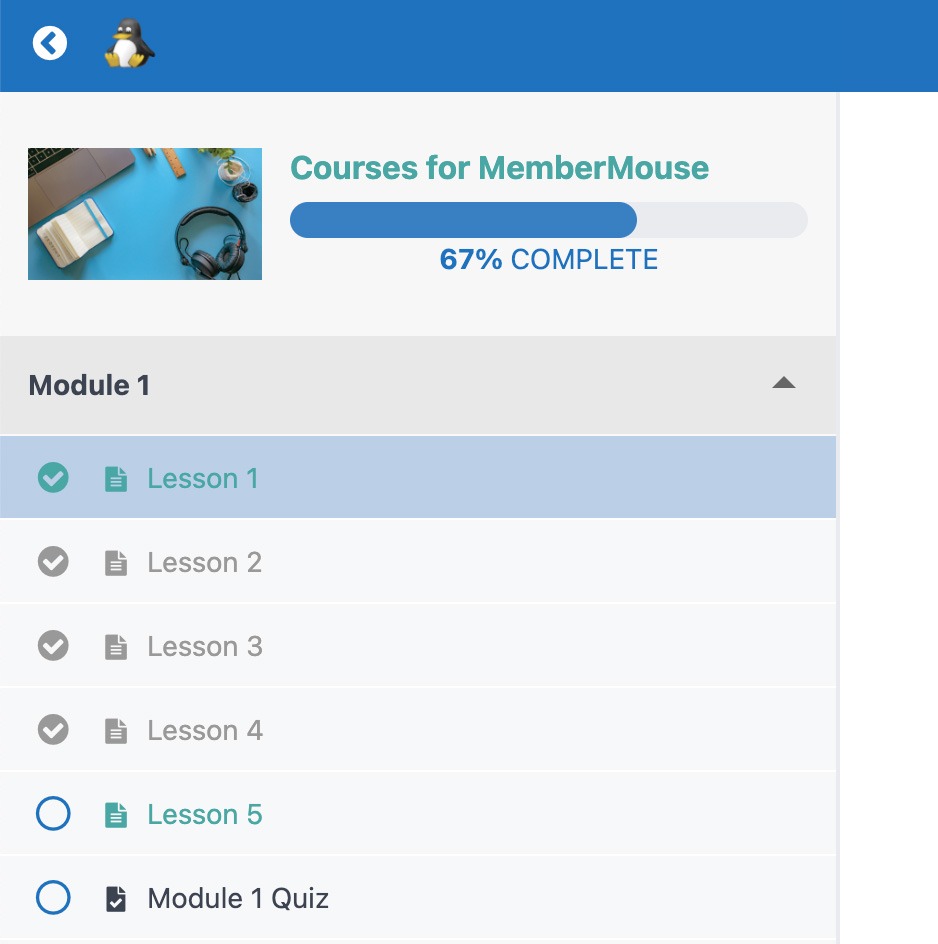
Step 2: Integrating Quizzes and Assessments
It is one thing to ask an employee to watch a video; it is another to ensure they understand it.
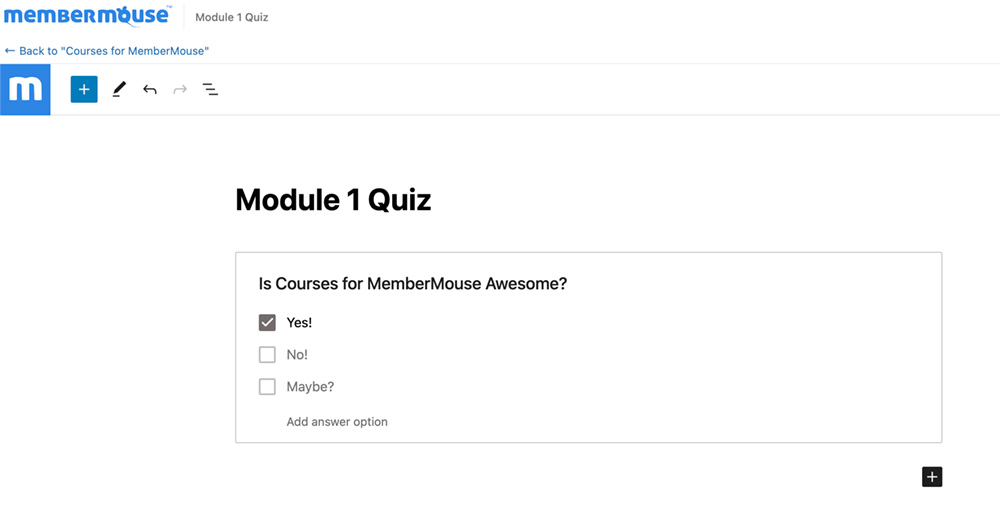
Usando o Cursos para o MemberMouse add-on, you can easily add quizzes at the end of each lesson.
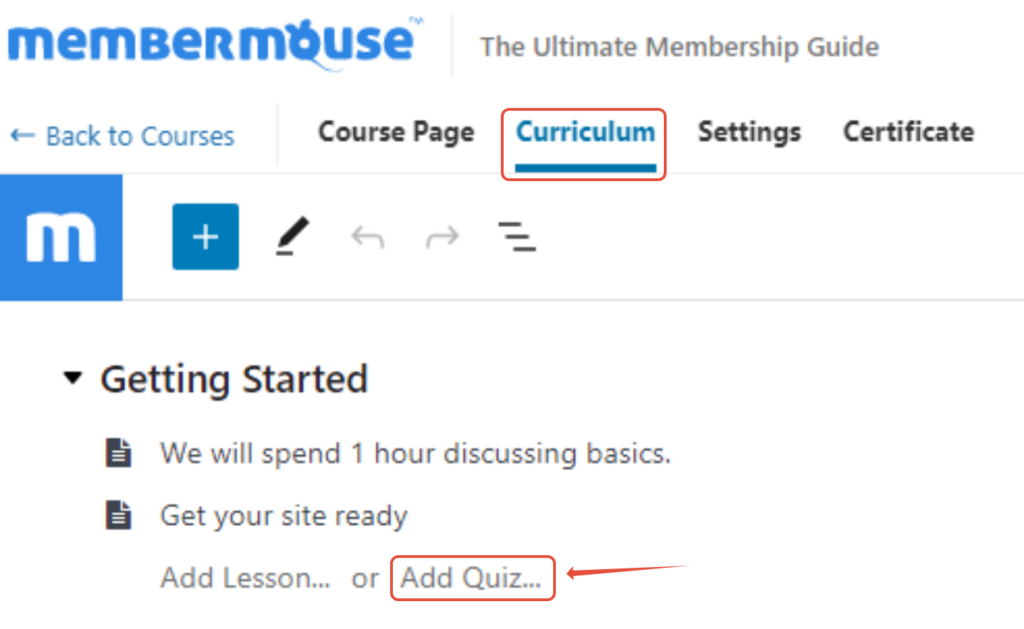
I love this feature because it acts as a quality check. You can set it up so that an employee cannot move to the next module until they pass the quiz. This guarantees that by the time they finish the course, they have actually learned the material.
Step 3: Customizing Certifications
Completion needs to feel like an achievement. If your employee puts in the work, they deserve something that looks official.
MembroMouse allows you to generate professional certificates automatically. You can – and should – customize these.

Upload your company logo and add the CEO’s digital signature. When an employee downloads that PDF, it shouldn't look generic; it should look like a formal accreditation from your company. It’s a small detail that adds a lot of value and pride to the accomplishment.
Step 4: Launching the Program
Once everything is built, it is time to roll it out.
My advice here is to treat the launch like a big deal. Don't just send a quiet email on a Friday afternoon. Announce it during a team meeting. Explain por que you built it and how it benefits eles (like helping them get promoted).
To ensure smooth adoption, you might even start with a small “pilot group” of employees to test it out and give feedback before opening it up to the whole company.
How to Make the Most Out of Your Certification Program
Building the course is only half the battle. Once your team starts using it, you need to know if it is actually working.
You don't want to just launch it and hope for the best. You want to see results.
Here is how you can use MemberMouse to manage the ongoing success of your program.
Track Who Is Learning (And Who Isn't)
If you can't measure it, you can't manage it.
One of the features I rely on most with the Cursos para o MemberMouse add-on is the built-in progress tracking. You don't have to guess if “John from Sales” actually watched that training video or if he just skipped it.
- See Who is Active: You can log in and see exactly where each employee is in the course. Are they stuck on Module 2? Did they breeze through Module 4?
- Quiz Scores: You can view quiz results to see if there is a specific topic that everyone seems to be failing. This is a huge red flag that tells you maybe that specific training module needs to be clearer.
- Completion Rates: You can quickly identify your “star students” who are finishing certifications early, as well as those who might need a gentle nudge to get back on track.
Keep Your Content Fresh and Relevant
Your business changes fast, and your training needs to keep up.
I always tell business owners: Your first version won't be your final version.
You should actively ask your team for feedback. After they finish a certification, ask them simple questions: Was this helpful? Was anything confusing?
Since MemberMouse is built on WordPress, you can easily embed a simple feedback form (like WPForms) right at the end of the course.
Use that feedback to refine your content. If three employees tell you that the “Inventory Management” video is outdated, you can simply record a new one and swap it out in MemberMouse in minutes. This keeps your training alive, relevant, and actually useful.
Conclusão
Creating a certification program might feel like a big project to take on. I get it! You are already busy.
But as we’ve seen, it doesn't have to be complicated. You don't need a team of expensive developers or a massive IT budget to make this happen. With MembroMouse, you have everything you need to build a professional, secure training hub right now.
And you won't just hand out certificates. You are building a culture that will help your business grow.
When you give your employees an opportunity to grow, they pay you back with loyalty and better work. A certified team is a confident team. And when your team gets better, your business runs smoother, faster, and more profitably.
Ready to Start Building? Explore MemberMouse Courses & Certifications Now
I Want to Hear From You
What is the biggest challenge you face when training new employees? Is it consistency, time, or just getting the information to stick? Let me know in the comments below. I’d love to hear how you plan to tackle it!
Deseja dicas, ideias e insights para ajudá-lo a criar e ampliar seu negócio on-line? Siga-nos em Facebook, Twittere LinkedIn.


Sarah Olaleye
Sarah Olaleye writes about what it takes to build and grow a membership business beyond the initial launch. With experience in SEO, content marketing, WordPress, and managing online businesses, she understands the work behind attracting members, keeping them engaged, and creating reliable revenue. At MemberMouse, she helps business owners make smarter decisions about memberships, automation, and long-term growth.

 PT
PT  EN
EN  ES
ES  DE
DE  FR
FR 


