 Blog
Blog Podcast
 Suporte
 Login do cliente

3 recursos poderosos que ajudam você a economizar tempo e aumentar o lucro
Em uma manhã gelada de fevereiro, fizeram-me uma pergunta interessante no final da minha sessão do Friday Office Hours.
After I saw the question pop up in the Zoom Q&A, I sat back in my chair for a brief moment of contemplation.
It got me thinking and helped me reflect on a few points I’d like to share with you today.
Aqui está a pergunta:
"Qual é o seu recurso favorito do MemberMouse?"
My favorite features in MemberMouse have always been the ones that help to automate things. It’s usually the things that people don’t see or even know the value of.
Por exemplo, o processamento automatizado de pagamentos em atraso característica.
The reason I love this feature so much is because I’ve always been a process person. In my career as a software engineer and architect, I focused a lot on process efficiency. I was usually passionate about working on products that helped to improve processes and make them more efficient. And so, the reason I like all the automation features is because that’s exactly what they do.
Here’s the thing: a lot of people don’t even know about these processes that are going on in the background of MemberMouse. Each one of these automation features was added to the platform for a very specific and strategic reason.
Esses recursos resultaram de uma experiência que tivemos diretamente (porque usamos o MemberMouse no MemberMouse.com). Or, one of our larger, high-volume clients had a real need for it. The benefit of working with these high-volume clients is that we get a real-world stress test of the system. From there, we can see where things are and aren’t working.
And that’s not to say that the feature itself wasn’t working. It’s not that something was broken.
I’m approaching this from a business context. If you’re looking to increase the profitability of your business, you have two main options. You can either increase your revenue or decrease your support costs. Many of the automation features built into the core of MemberMouse do both.
Protect Your Time & Collect More Payments
Por exemplo, imagine uma situação em que você tenha milhares de membros usando seu site. Uma das coisas que fazem parte de seu negócio é que uma porcentagem dos cartões de crédito de seus membros é recusada em assinaturas recorrentes.
Now, imagine that you had to call each one of your members every time their cards failed. Well, now you’ll probably have to find someone, hire someone whose job it is do this. Of course, you’ll have to pay the person to do this.
This is all going to increase the amount of time and money you’re spending on support. Thus, decreasing your profits. Plus, when you actually call people to update their credit cards on your site, you’re essentially chasing someone down to pay you money. This isn’t the most fun thing to do and people will usually avoid doing this as much as possible.
É por isso que o recurso de processamento automático de pagamentos em atraso é tão valioso.
Having this entire process automated in the system can save you untold amounts of time and money. You’ll not only capture revenue that may not have been captured otherwise, you’ll also significantly reduce the amount of time on your books to actually have to manually go through that process and take care of it.
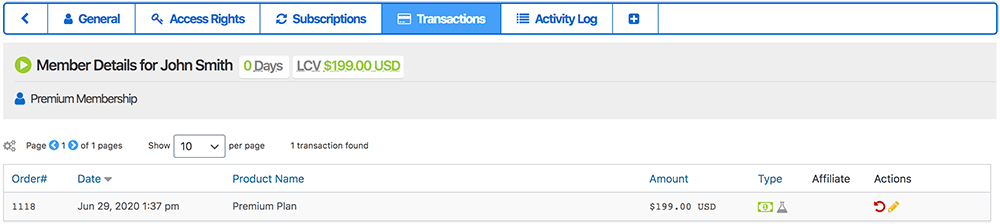
Veja a atividade de pagamento no registro de transações
Here’s a closer look at how the automatic overdue payment handling feature works:
When a rebill payment fails, MemberMouse is notified. When this happens, MemberMouse will put the member’s access rights into overdue status. This means that they will not be able to access any of the content that’s protected by their membership level or bundle.
Whether they have access to pages with your videos or a private community forum, the member won’t be able to see any of those things until a successful payment goes through. If you don’t want your members to lose access as soon as their accounts go into overdue status, you can even create specific configurations that allow them access even when overdue.
From there, the member will automatically be sent an overdue payment notification. A default notification email is set up when MemberMouse is installed, but it’s completely customizable and can be modified to suit your needs. An important component of this email is informing the member that they can update their billing information right from their Minha conta page. Yes, this means you don’t have to manually do it yourself!
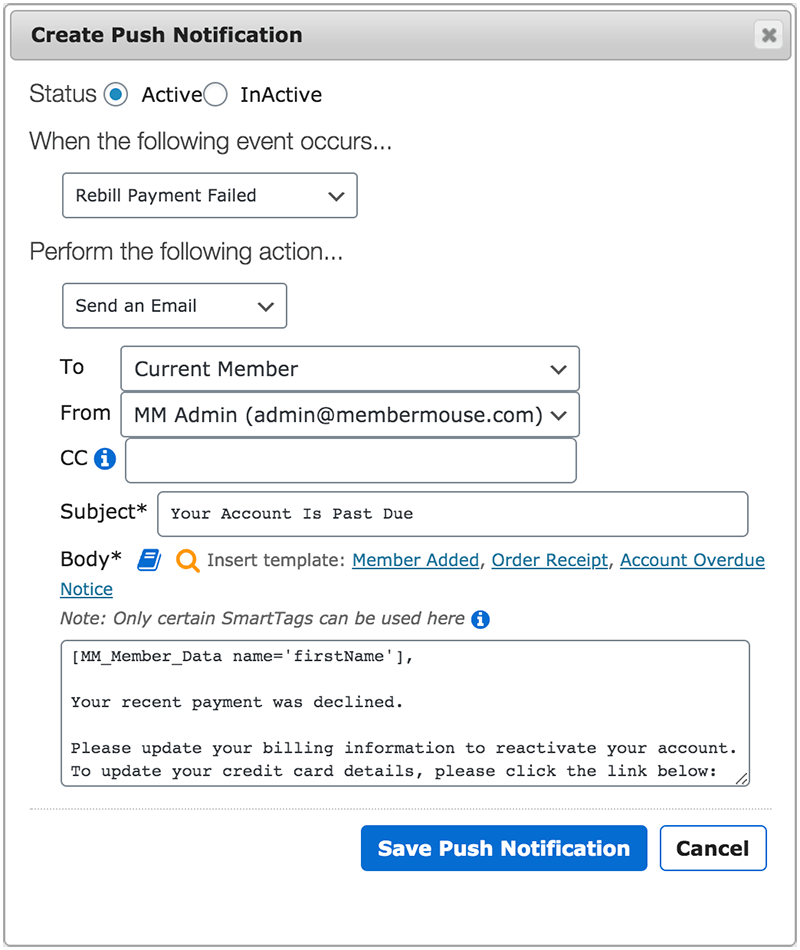
Enviar automaticamente um lembrete de pagamento em atraso
After the member has updated their billing information and been billed for the missed payment, their access rights will automatically be reactivated. As a result, they’ll be able to see all of their protected content again.
Depending on the payment method you’ve integrated with, MemberMouse will automatically attempt to rebill the customer a total of 3 times while in overdue status. The first attempt will occur 2 days after the initial attempt. The second attempt will occur 5 days after the initial attempt. The third attempt will occur 7 days after the initial attempt. If the final rebill attempt fails, MemberMouse will automatically cancel the member’s access rights, and they will have to purchase the subscription option again in order to regain access.
Se você quiser obter informações mais detalhadas sobre como isso funciona, consulte este artigo detalhado sobre tratamento automatizado de pagamentos em atraso.
Mantenha o controle de tudo para seus membros
Há muitos outros recursos como esse - nosso registro de atividades, for example. The member specific tracking that the activity log makes possible is a really useful tool. It helps you see exactly what somebody has done when they’re logged in on your site.
Por exemplo, se um de seus clientes lhe enviar uma mensagem com perguntas sobre algo, você poderá facilmente olhar para trás e ver quais páginas ele acessou, quando fez login, quando foi cobrado, quais e-mails foram enviados a ele, quando esses e-mails foram enviados etc.
Ter a capacidade de visualizar esses itens pode ser especialmente útil em cenários de estorno. Se alguém emitir um estorno por uma compra que fez em seu site e alegar que nunca acessou seu site, visualizou seu conteúdo ou algo do gênero, você poderá criar facilmente um relatório que desminta isso.
Again, back to our high-volume clients, they love this feature specifically because chargebacks are one of those things in business that you really have to keep an eye on. If your chargeback rate ticks up when you have more customers, you’ll need to have a strategy in place for how you’re going to handle those and recapture some of those chargebacks. This is just one reason why the activity log is such a valuable feature.
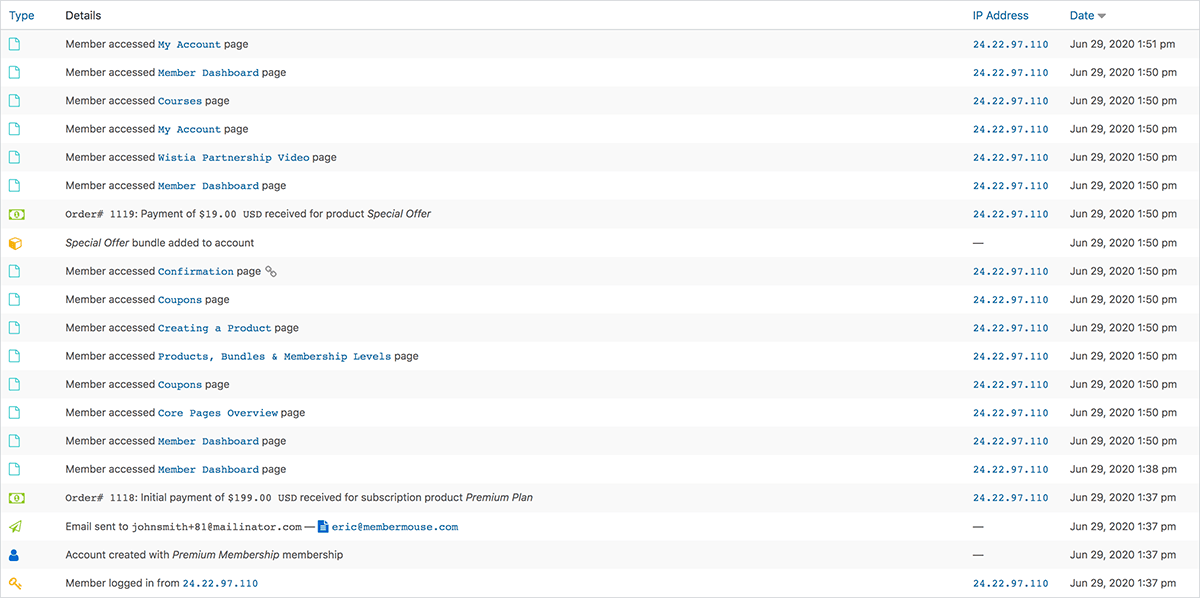
An example of what you’ll see in the member activity log
Here’s a quick synopsis of how the activity log works:
Todas as atividades relacionadas a membros que ocorrem em seu site se enquadram em um dos seis tipos de eventos:
Direitos de acesso: Esses eventos ocorrem sempre que alguém cria uma conta, cancela sua conta ou o status da conta muda (pausado, ativação pendente, bloqueado etc.)
Rastreamento de afiliados: Esse evento inclui qualquer informação referente a solicitações de comissão, como comissões iniciais, comissões de cobrança ou comissões encerradas.
Faturamento: Esse tipo de evento mostra se um membro seu foi cobrado com sucesso ou sem sucesso.
E-mail: Esses eventos incluem todos os e-mails que são acionados pelo MemberMouse, como e-mails de boas-vindas, e-mails de notificação por push e outros.
Login: Os eventos de login são registrados sempre que um membro faz login no seu site. O e-mail, o IP específico e a data são registrados quando um membro faz login.
Acesso à página: each time one of your members accesses a page on your site, the following gets logged: the user email, the page they accessed and any affiliate ID’s tied to the link, the IP used to access the page, and the date it was accessed.
All of these different event types help you review your members’ activity history and learn more about how they use your site. You can Saiba mais sobre o registro de atividades aqui when you’re ready.
Here’s another thing I love about the activity log: not only can you see it on the individual member level, but you can see it for your entire site as a whole. In the Registros menu, você pode ver um registro de tudo o que aconteceu no seu site em tempo real.
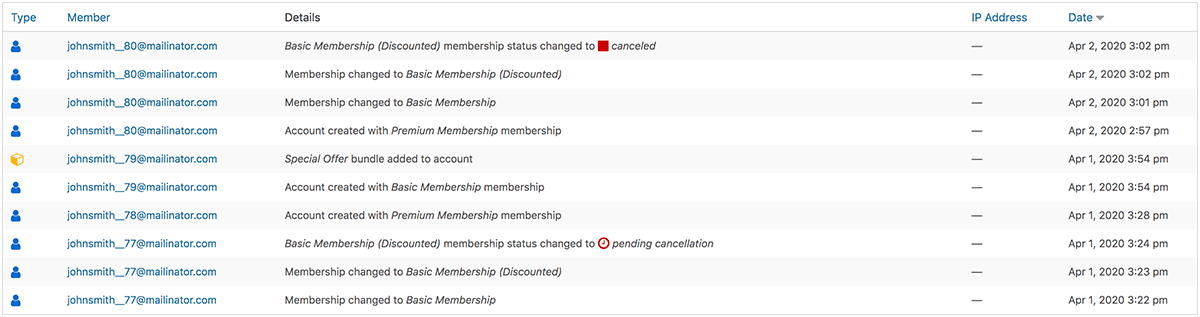
Um exemplo de como é o registro de atividades em todo o site
You also have the ability to sort this activity based on the six event types we’ve defined above. Did you just launch a new module for your course? Check the logs and see who first engaged with that page. What’s great is that this information can even be organized and shown to you based on specific date ranges as well. Want to see who logged into your site over the weekend? Check the logs.
Se quiser ver um registro de todas as páginas acessadas por seus membros em um dia, semana ou mês específico, você pode fazer isso. O mesmo vale para login, faturamento e todos os outros tipos de eventos. Pode ser muito útil e informativo ver todas essas informações exibidas em um só lugar.
Implemente suas melhores ideias com SmartTags™
SmartTags™ são outro dos meus recursos favoritos.
If you’re not familiar with SmartTags™, here’s a quick overview of how they work:
Essentially, SmartTags™ allow you to have dynamic conversations with your customers based on actions they’ve taken (or haven’t taken) on your site. This means you can identify segments of your members and choose to display (or hide) content to them. What’s more, this is all possible for you without having to program or code anything. As you can imagine, this becomes very powerful.
O que eu adoro nas SmartTags™ é que elas facilitam as conversas personalizadas com seus membros. O resultado de poder fazer isso não é apenas uma experiência muito mais humana para seus membros, mas também taxas de conversão mais altas, retenção mais longa e, por fim, maior valor de cliente vitalício.
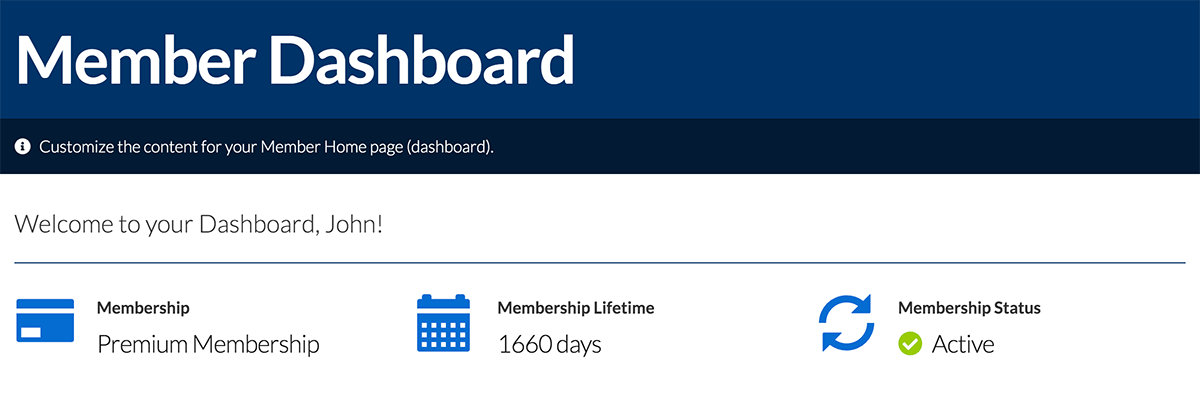
Exemplos de como as SmartTags™ serão exibidas em seu site
Here’s an example of what this looks like:
Você pode usar o Dados do membro SmartTag to strategically greet your members by their name. Or, you could choose to display the amount of time they’ve been an active member on your site. If you’re helping people achieve a particular goal with your membership, it can be encouraging to see how long you’ve stuck with something.
And that’s just the tip of the iceberg. Seriously.
Por exemplo, o Decisão do membro SmartTag lets you show specific content to your members based on the specific attributes of their membership. This allows you to show new offers to people who have or haven’t bought certain products in the past, have been with you for a certain amount of time, or has even paused or canceled their membership.
The topic of SmartTags™ deserves its entire blog post. And that’s exactly why we wrote one for you! If you’d like to learn more about how you can put the power of SmartTags™ to work, esta postagem do blog oferece uma visão geral detalhada de como você pode usá-los em seu site.
Testado contra estresse: Confiabilidade comprovada sob pressão
Mais do que todos esses recursos individuais, acho que um dos aspectos de que mais gosto no MemberMouse é simplesmente o mecanismo. O desempenho geral. Muita coisa foi feita sob o capô que as pessoas nunca verão. Um dos aspectos pelos quais o MemberMouse é conhecido é sua confiabilidade. Mais especificamente, a confiabilidade sob estresse. Ou seja, em sites com um alto volume de transações e um grande número de membros.
I guess this is now speaking to a higher-level picture. The thing I really like about MemberMouse is the fact that you can start using it for just 20 members and it will grow with you. You don’t have to switch to a different solution to get to 100,000 active members.
At each stage of your business — where you’re going to need more features or functionality — you may not even be aware that you’re going to need that before you get to the point. But as soon as you know you do need it, MemberMouse has an answer for you built in.
Anyways, I could go on and on because there are many other things that I like. But, I think that’s enough for now. If you have any questions at all about the features we talked about today, please leave me a comment below.

Eric Turnnessen
Eric Turnnessen é o fundador do MemberMouse. Sua dedicação absoluta à qualidade e a insistência na perfeição fizeram do MemberMouse o principal plug-in de associação do WordPress no mercado atual. Sua atenção aos detalhes e seu compromisso com o aprimoramento contínuo fazem do MemberMouse a opção #1 para proprietários de empresas que buscam uma solução de associação confiável e escalável.




 PT
PT  EN
EN  ES
ES  DE
DE  FR
FR 


