 Blog
Blog Podcast
 Suporte
 Login do cliente
Canceling a bundle will cancel any related subscription for that bundle but will not cancel the member’s account. When a bundle on a member’s account is canceled, they’ll be able to log in, but they won’t be able to access any content that’s protected by the canceled bundle. If the bundle did not have any subscription payments, then the member’s bundle will move to a cancelado estado imediatamente.
No entanto, se o pacote que foi cancelado for uma assinatura, a data de cancelamento será determinada no momento em que a conta for solicitada para ser cancelada e dependerá de onde ela estiver em sua assinatura.
For example, if their subscription rebills monthly and they cancel halfway through the month, their cancellation date will be set for approximately 15 days in the future. If their subscription rebills annually and they cancel 3 months in, their cancellation date will be set for approximately 9 months in the future. In this situation, the member’s bundle will enter a Cancelamento pendente status. Leia este artigo para Saiba mais sobre os diferentes status de membro.
Observação: Um membro pode cancelar seus próprios pacotes na página My Account (Minha conta), na seção Subscriptions (Assinaturas).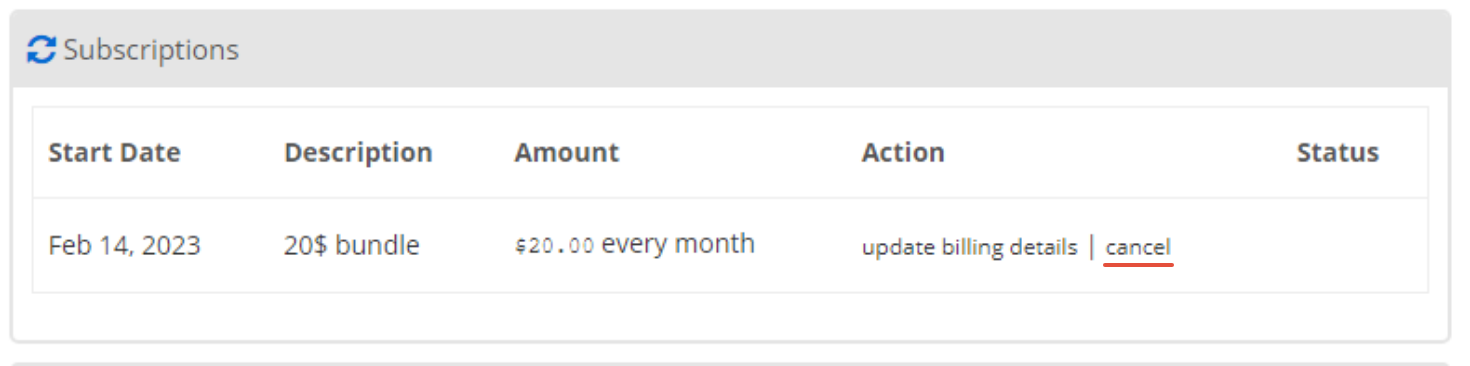
Como cancelar manualmente o pacote de um membro
- Ir para MembroMouse > Gerenciar membros and find the member you want to change the expiration date for. Click on this member’s email address or the edit icon on the right in order to view the details for that member.
- Clique no botão Direitos de acesso guia.
- Localize o pacote que você deseja cancelar na seção Pacotes e clique no ícone de cancelamento:

- Clique em ok quando a janela pop-up solicitar a confirmação:

- Você verá que o pacote agora aparece como Cancelado ou como Cancelamento pendente. Se for Cancelamento pendenteSe o pacote for cancelado, você também verá a data em que o pacote será totalmente cancelado.
- Se você precisar ajustar essa data, clique no ícone de edição ao lado do pacote:

- Clique no campo de data e navegue até a nova data de expiração no calendário que aparece:

- Clique no botão Salvar button to save your changes. After changing a bundle’s expiration date, the bundle status will immediately reflect whether or not it’s expired based on the new date.

 PT
PT  EN
EN  ES
ES  DE
DE  FR
FR 


