 Blog
Blog Podcast
 Support
 Customer Login

7 Instant Upsell Opportunities for Your Online Course
Drip content is one of our most popular features, especially for delivering online course content. Releasing regularly, week-by-week is usually a smart move. It keeps students focused and prevents them from getting overwhelmed.
However, a strict schedule doesn't work for everyone.
Some students are fast. They have a deadline and want to finish now. Others might be struggling and need extra help just to keep up.
If you treat everyone exactly the same, you leave money on the table.
This used to be me but I eventually found a solution with MemberMouse. Let me tell you all about it.
Most membership plugins are rigid. If you want to sell a new product to an existing member, you usually have to create a complicated new “membership level” or subscription. It gets messy.
But MemberMouse handles this differently with Bundles.
Think of a Bundle like a digital shopping cart item. It lets you sell a one-time product – like a pack of templates or instant access to your archives – without disrupting the member's main subscription.
This flexibility opens up a whole world of potential for you. You can now sell instant upgrades to the people who are happy to pay for them.
Below, I will show you seven ways you can use Bundles to help your students, increase your revenue, and how you can do this with MemberMouse.
7 Course Bundle Ideas To Instantly Up Your Average Order Value
So, what exactly can you sell as a Bundle?
The beauty of this feature is that you don’t always need to create something brand new. Often, it is just about packaging your existing value in a way that solves a specific problem for a specific type of student.
Some students have more money than time. Some have more curiosity than patience. Others just need a helping hand.
Here are seven specific Bundle ideas you can implement right away to serve them all.
1. Supplementary Resource Bundles
Not every student starts your course with the same level of experience. While most might follow your curriculum easily, some might struggle with the basics and fall behind.
If a student feels lost, they are likely to stop logging in – and eventually cancel.
You can prevent this by offering a Supplementary Resource Bundle. This is a collection of extra guides, glossaries, or “back-to-basics” videos designed to help students who need more context to understand your main content.
Example: If you teach an intermediate photography course, you could sell a “Camera Settings Cheat Sheet” bundle. The main course assumes they already know how to use their camera, but this affordable add-on gives struggling students the technical help they need to keep up without slowing down the rest of the class.
2. Advanced Bonus Content
Your standard course needs to remain accessible. If you include every single technical detail, you risk overwhelming the average student who just wants a quick result.
But some students want to know everything. They want to know exactly how everything works behind the scenes.
You can sell a “Nitty-Gritty Bundle” to these students. This lets you keep your main lessons clean and easy to follow, while offering the complex details to the people who actually want them.
Example: Your course can be on “Blogging for Beginners.” While your main lessons would be on how to write clear sentences, basic SEO, and catchy headlines, you could sell a separate “Technical SEO” bundle that explains schema markup, canonical tags, and site architecture. The average writer just wants to hit publish, but your devoted students will pay extra to ensure their site ranks #1 on Google.
3. Instant Access to All Content
Drip content is great for preventing overwhelm, but it can be frustrating for your most motivated students.
We all know the type. They sign up on a Friday night, cancel their weekend plans, and want to learn everything by Monday morning. If you force them to wait seven days for “Module 2,” they lose momentum. They might even get annoyed enough to ask for a refund.
You can solve this by selling an Instant Access Bundle.
This allows a student to pay a one-time fee to bypass the schedule and see every lesson immediately.
Example: In a “30-Day Yoga Challenge” course, the standard plan releases one video every morning. However, some students might want to see the whole month's schedule upfront so they can plan their routine. You can offer an “Instant Access” upgrade for $20 that lets them view all 30 videos on Day 1.
4. The Archive Bundle
If you run a membership site that releases content monthly – like live Q&A sessions or guest webinars – you likely have a valuable “back catalog” of content.
When a new member joins, they are usually focused on what is happening this month. They might not have access to the recordings from six months ago, or perhaps you drip those older recordings out slowly to prevent overwhelm.
You can use a Bundle to sell immediate access to your entire library of past content.
This allows new members to get “up to speed” immediately by binge-watching your previous sessions, while still keeping them on the monthly drip schedule for future content to ensure they stay subscribed.
Example: You run a “Small Business Coaching” membership where you host a live group coaching call every month. A new member who joins today gets access to this month's call. You can then sell a “2024 Archive Bundle” that instantly unlocks the recordings of every coaching call you hosted last year. The member gets immediate value, and you monetize content you created months ago.
5. Seasonal Content Bundles
Most drip content runs on a “student schedule.” If a student signs up today, they get Lesson 1. If they sign up next month, they get Lesson 1.
But sometimes, the calendar date matters more than the lesson number.
If you have a special lesson on “Christmas Holiday Sales,” you want your students to see it in December. If that lesson is scheduled for Week 12 of your course, a new student might not unlock it until March. That timing doesn't help them.
You can use a Bundle to sell this specific content to everyone at the same time, right when the topic is trending.
Example: For a digital marketing course, you likely have a strategy for Black Friday sales. Instead of keeping this inside your normal course schedule, you can sell it as a separate “Black Friday Bundle” in November. This allows every student to access it immediately, exactly when they are looking for that information.
6. Implementation Template Bundles
Teaching your students how to do something is valuable. But giving them the tools to actually do it is even better.
Many students understand the theory of your lessons, but they stall when it comes time to execute. They stare at a blank page or an empty spreadsheet and don't know where to start.
You can help them overcome this hurdle – and make extra revenue – by selling a “Done-For-You Bundle.”
This is a collection of the exact templates, checklists, or files you use in your own work. You are selling them a shortcut. Students are often happy to pay a premium to save hours of setup time.
Example: In a “Client Consulting” course, the main lessons teach students how to negotiate. The “Contract Template Bundle” is the perfect upsell. It includes the exact legal agreements and proposal documents needed to close the deal. Students save hours of drafting time, and you provide a valuable shortcut.
7. Live Workshop Access
Sometimes a student needs direct access to you but isn't ready to commit to a high-priced monthly coaching tier.
They might have a specific question about their business, or they just want feedback on a single project.
You can use a Bundle to sell a “One-Day Pass” to a live event. This allows you to organize a special Q&A session or a “Hot Seat” workshop and sell individual seats to your existing students. It monetizes your time effectively and gives students a VIP experience without changing their membership level.
Example: In a graphic design course, a “Portfolio Review Workshop” is a high-value upsell. The Bundle grants entry to a single live Zoom call where you critique student designs in real-time. Students get expert feedback on their work without needing to sign up for a recurring mentorship program.
How to Execute This With 1-Click Upsells
You are probably excited by the prospects of making more money and getting your valuable course before the right audience at the right time.
But to make this work, you have to remove the friction.
If a current member has to fill out a checkout form and re-enter their credit card details just to buy a $20 template pack, they probably won’t do it. Every extra field they have to type is a chance for them to change their mind.
This is why you need MemberMouse One-Click Upsells. This is the tool I use to make upselling quick and easy, just in one click.

MemberMouse supports Card-on-File transactions. If you have ever bought something on Amazon or paid for an Uber, you know exactly how this works.
You don't type in your 16-digit credit card number every single time you buy something. You enter it once, and the system remembers it securely for future purchases.
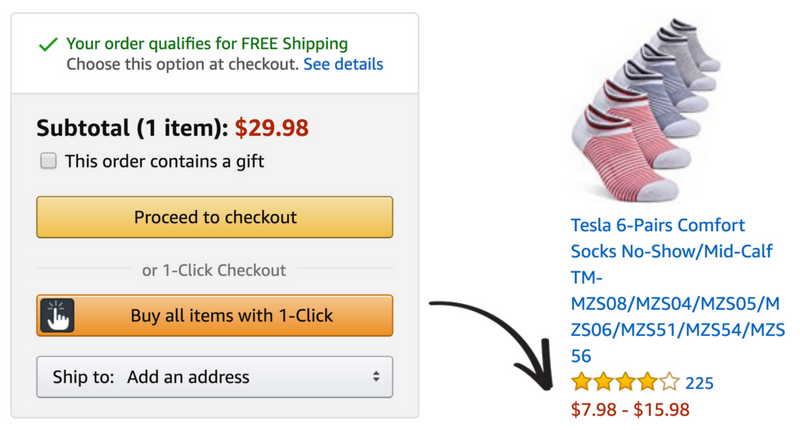
MemberMouse does the same thing for your site.
Because the system securely stores the member's payment method after their initial signup, you can present these upsell offers with a simple “Buy Now” button.
The member clicks the button once, and the card is charged immediately. No forms, no typing, no friction. This seamless process significantly boosts conversions.
Now, one question that is probably on your mind is, “How will my members see these offers?” Well, here is how you can do it in a grand style.
You can also get tactical about when these offers appear using SmartTags™.
SmartTags™ allow you to personalize the member experience by showing or hiding content based on a user's purchase history or membership level.
- Prevent Double Buying: You can set the “Buy Now” button to disappear automatically if the member has already purchased that specific Bundle.
- Target the Right Moment: You can display an offer for extra help – like your cheat sheets – only on the specific lesson page where you know students tend to get stuck.
By combining flexible Bundles with frictionless 1-Click Upsells, you create a system that serves your students better and increases your revenue automatically.
When you offer flexibility, you help the student who is stuck, the student who is in a rush, and the student who wants to master every detail. You are giving them the control to learn on their own terms.
And when you serve your students better, you make more money.
MemberMouse makes this easy because it doesn't force you to build a complicated web of membership levels. With Card-on-File transactions, you can set these offers up quickly as one-click upsells, and boost your average order value without friction.
Your Next Step? Start by looking for the biggest gap in your current course. Do you have students who are constantly asking for more advanced details? Or do you have a specific lesson where beginners always seem to quit?
Pick just one idea from this list that solves that problem. Set it up as a Bundle in MemberMouse, place a 1-Click Upsell button on your dashboard, and see how your students respond. You might be surprised at how many of them are waiting for the chance to pay you for a little extra help.
And if you don't have MemberMouse, get it today and start upselling.
The Enterprise Level Membership Plugin for WordPress
Solutions for every business. Built to support anything you can dream up.
Do you have any questions, or have you been using the MemberMouse One-Click Upsells and would like to share how it has helped your business? The comment is open! Tell me all about it!
Want tips, ideas, and insights to help you build and scale your online business? Follow us on Facebook, Twitter, and LinkedIn.


Sarah Olaleye
Sarah is passionate about simplifying the technical nitty-grittys of websites, plugins, and digital marketing. As a content writer at MemberMouse, she has a keen eye for crafting engaging and informative content. Sarah plays a crucial role in educating and empowering users on the full potential of MemberMouse plugins. Bringing a blend of technical knowledge and creative flair, she ensures that each piece of content not only informs but also inspires. When not writing, she enjoys exploring the latest trends in technology and digital marketing, always seeking new ways to enhance the user experience.

 EN
EN  ES
ES  DE
DE  FR
FR  PT
PT 


